Quick answer
For a CSS color overlay that leaves text opaque, use an alpha color such as background-color: rgb(51 119 153 / 20%). Setting opacity: 0.2 on the whole card also fades its contents. The visible background depends on both the overlay and the surface underneath.
A tinted card can look right until you add its label: the background is subtle, but the text looks washed out too. That usually means transparency was applied to the whole card. This CSS color overlay tutorial builds a blue-tinted surface while keeping the text fully opaque, then checks what changes when the same tint sits on a darker background.
You need a place to try a small HTML and CSS example, a source color, and a known background. We will use the #337799 color reference as the source: its RGB channels are 51, 119, and 153. The example is a plain informational card, so there are no button states or image assets to configure.
1. Put the CSS color overlay on the background
Alpha in background-color affects that background paint. The opacity property composites the element and its contents as a group. A child with opacity: 1 cannot undo its parent’s group opacity. For this card, leave the element opaque and make only its background color translucent.
| Intent | CSS approach | Effect on text |
|---|---|---|
| Tint a card surface | background-color: rgb(51 119 153 / 20%) | Text keeps its own opaque color. |
| Fade the entire card | opacity: 0.2 | The background and contents both fade. |
| Keep a fixed pale blue | background-color: #D6E4EB | Text stays opaque; the surface no longer responds to the backdrop. |
The slash value is alpha: 20% means the source contributes one fifth in this simple compositing example. It does not mean 20% transparent. Use the same terminology in a design handoff so an implementation does not accidentally reverse the intended strength.
2. Resolve the tint against the actual surface
Open the Hue Codex Opacity Calculator. Enter #337799 in Overlay, #FFFFFF in Background, and set Alpha to 20%. The resolved HEX result is #D6E4EB. Keep the overlay and alpha unchanged, then replace the background with #172333: the result becomes #1D3447.
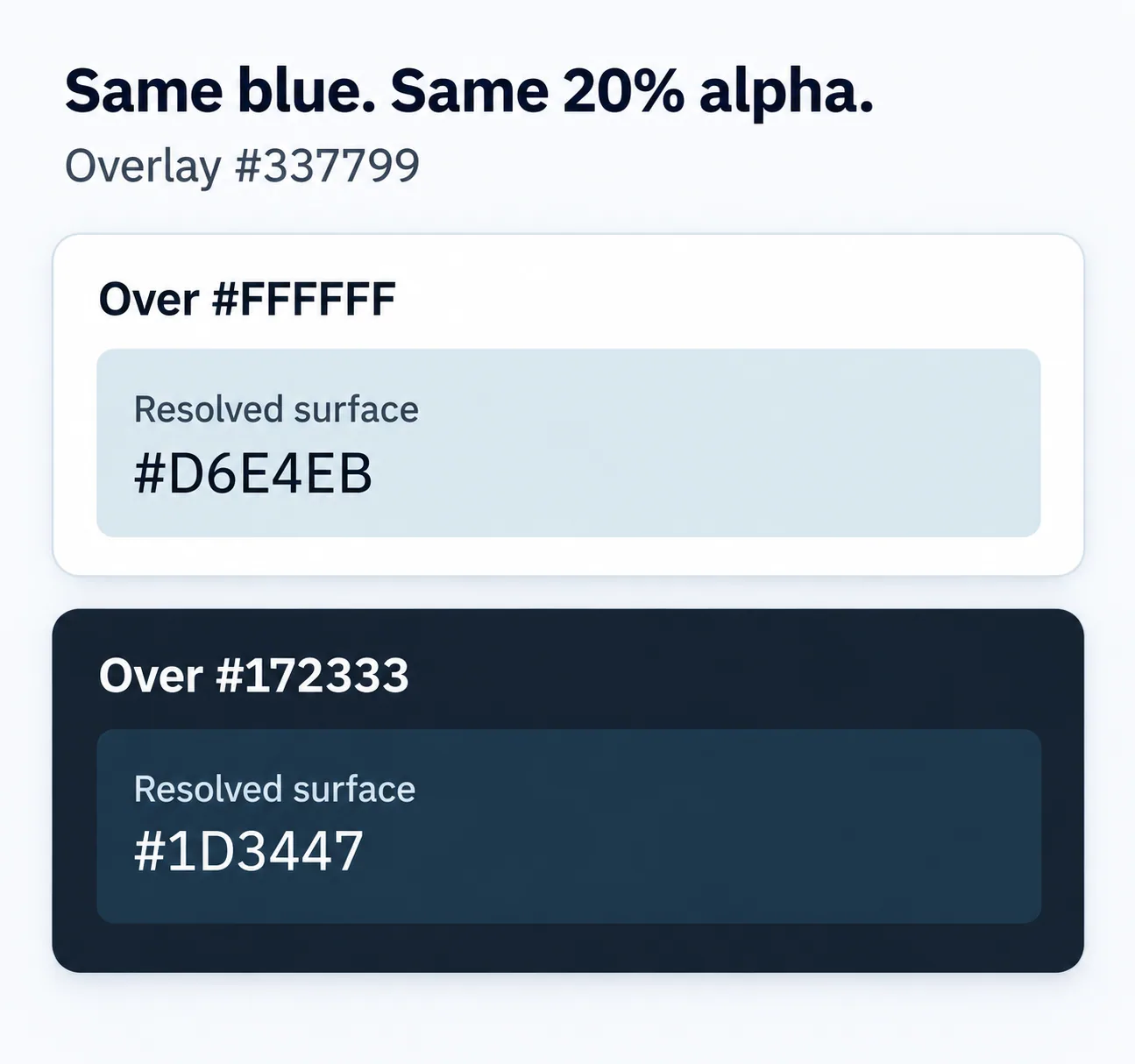
For normal source-over compositing of this sRGB overlay onto an opaque solid background, each result channel is source × alpha + background × (1 − alpha). On white, the red channel is 51 × 0.2 + 255 × 0.8 = 214.2. Rounding the three channels for an 8-bit HEX handoff gives 214, 228, 235: #D6E4EB.
Enter the six-digit source HEX and set alpha once. Hue Codex multiplies any alpha already embedded in the overlay input by the Alpha control. Entering a 20% alpha color and also choosing 20% on the slider would produce 4% effective alpha. That is a different test.
This calculation is scoped to a solid, opaque sRGB backdrop with normal compositing. An image, another translucent layer, a blend mode, or a filter changes the setup. A single flattened HEX cannot describe every pixel of a tinted photograph.
3. Build a card with independently colored text
This complete starting example puts the card on a known white canvas. The first background declaration is an opaque fallback matching the rounded result on white; the second uses the alpha color. Its text color remains #172333. The fallback is specific to this white backdrop and is not interchangeable with the overlay on another surface.
<!DOCTYPE html>
<html lang="en">
<head>
<meta charset="utf-8">
<meta name="viewport" content="width=device-width, initial-scale=1">
<title>Tinted card example</title>
<style>
  body {
    margin: 0;
    padding: 1rem;
    background: #FFFFFF;
    color: #172333;
    font-family: system-ui, sans-serif;
    line-height: 1.5;
  }

  .tinted-card {
    max-width: 32rem;
    padding: 1.5rem;
    border-radius: 1rem;
    background-color: #D6E4EB;
    background-color: rgb(51 119 153 / 20%);
    color: #172333;
  }

  .tinted-card h1 {
    margin: 0 0 0.5rem;
    font-size: 1.25rem;
  }

  .tinted-card p {
    margin: 0;
  }
</style>
</head>
<body>
<main>
<article class="tinted-card">
  <h1>Project notes</h1>
  <p>A blue-tinted surface with independently colored text.</p>
</article>
</main>
</body>
</html>
If you want this exact pale surface everywhere, keep only the opaque declaration. If the tint should respond to its backdrop, retain the alpha declaration and document the surfaces it may appear on. Those are different design requirements; decide which one the component needs before copying a value into a token.
4. Test text against the resolved background
Use the Hue Codex Contrast Checker with #172333 as the foreground and #D6E4EB as the background. Testing the text against the original #337799 would test a surface this card does not actually display. Repeat with each resolved surface and the text color intended for it.
| Underlying surface | Resolved card | Opaque text | Ratio | Normal-text result |
|---|---|---|---|---|
| #FFFFFF | #D6E4EB | #172333 | 12.20:1 | Pass |
| #172333 | #1D3447 | #172333 | 1.23:1 | Fail |
| #172333 | #1D3447 | #FFFFFF | 12.85:1 | Pass |
Ratios are displayed to two decimal places; pass/fail uses the unrounded calculation. These results cover the listed opaque text and solid backgrounds only. They do not establish full WCAG conformance or evaluate focus indicators, component boundaries, or color-only meaning. Large text has a separate 3:1 minimum, but this example keeps the stricter normal-text target.
In the browser, inspect the card on the surface where it will ship. Check that no ancestor has opacity below 1 and that the text has no separate alpha. If the card can overlap a photograph or scroll over changing content, resolve and review those backgrounds too, or use an opaque surface behind the text.
5. Record the overlay recipe in the handoff
A useful handoff preserves both the recipe and its checked result. For this example, record source #337799, alpha 20%, backdrop #FFFFFF, resolved surface #D6E4EB, text #172333, and normal-text contrast 12.20:1. Add the darker variant as a separate row with its white text. This lets the next person reproduce the decision instead of guessing what “blue at 20%” was meant to sit on.
- Save the alpha recipe when the surface is meant to change with its backdrop.
- Save a solid HEX when a fixed appearance is the requirement.
- Keep the tested backdrop beside any flattened fallback value.
- Recheck the pair when source color, alpha, backdrop, or text color changes.
Questions that come up during implementation
Can I use rgba() instead of rgb()?
Yes. rgba(51, 119, 153, 0.2) expresses the same absolute sRGB color and alpha as rgb(51 119 153 / 20%). Keep either syntax consistent in your project.
Why does the same overlay look different on another page?
A translucent color combines with what is beneath it. Check the actual backdrop and any additional transparency before changing the source blue.
Should I sample an antialiased letter edge for contrast?
Use the intended text color and the background it is rendered on. Antialiased edge pixels mix text and background and are not the authored text color used for this contrast calculation.
Try it on one real component
Take one tinted card from your interface and record its source color, alpha, and backdrop in the calculator. Compare the resolved surface with the CSS you ship, then check its actual text color. Keep that small evidence record with the component so the next background change is an explicit, repeatable review.
Spot an issue or want a color topic covered?Send a correction or request a post.