
Quick answer
A Delta E calculator estimates the difference between two colors using a named formula. Hue Codex reports Delta E 76 and OKLab distance scaled by 100. A low difference score can identify a candidate for review, but it does not establish that two design tokens are interchangeable or that a text pair meets contrast requirements.
A brand library has two greens that look almost identical. One came from the original design file; the other appeared during a component update. Keeping both may be accidental duplication, but replacing one everywhere could also change a button, a status message, or a carefully reviewed text pair.
A Delta E calculator helps you investigate the difference before making that decision. The useful outcome is a record of what can share a value, what must keep a separate role, and which combinations need another check. This example follows three opaque sRGB greens through that review.
What a Delta E calculator measures
Delta E names a family of color-difference formulas. Delta E 76 is straight-line distance between CIE Lab coordinates; CIEDE2000 is a different formula with additional corrections. Their numeric results should not be treated as interchangeable. Record the formula beside every score, especially when a colleague or supplier uses another calculator.
| Result | What it measures | How to use it |
|---|---|---|
| Delta E 76 | Distance in D50-adapted CIE Lab. | Compare how far a candidate moves from the source using the same formula. |
| OKLab distance ×100 | Straight-line OKLab distance multiplied by 100. | Use as a separate comparison signal; keep the scale attached to the number. |
| Contrast ratio | Luminance contrast between the two input colors. | Evaluate that particular foreground/background pairing, not an unentered text color. |
Hue Codex currently calculates Delta E 76 rather than CIEDE2000. Its OKLab value is also not a percentage: 1.66 does not mean “1.66% different.” The Color Difference Methodology explains these choices and their limitations, including why the interpretation bands are review aids rather than universal acceptance standards.
A small green change with a practical consequence
Use #367F69 as the reference green. Candidate A, #38816B, increases each RGB channel by two; candidate B, #3B846E, increases each by five. Those edits produce different distance values, and both fit the calculator’s Near match review band. Now consider a component that places opaque white normal-sized text on the green.
| Background | Delta E 76 | OKLab ×100 | White text contrast | AA normal text |
|---|---|---|---|---|
| #367F69 · reference | 0.00 | 0.00 | 4.78:1 | Pass |
| #38816B · candidate A | 0.77 | 0.67 | 4.65:1 | Pass |
| #3B846E · candidate B | 1.93 | 1.66 | 4.46:1 | Fail |
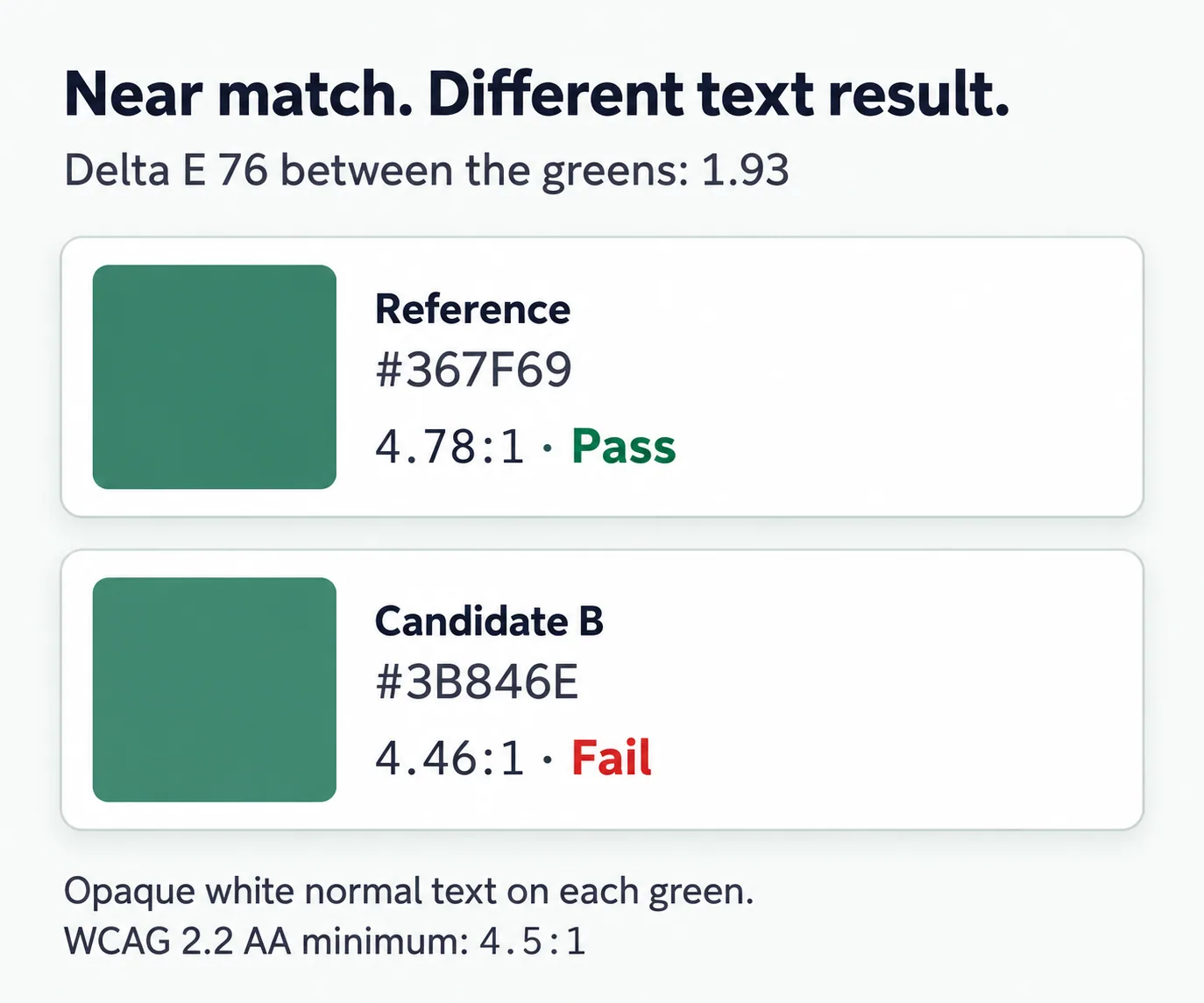
WCAG 2.2 AA requires at least 4.5:1 for normal text under Contrast (Minimum). Candidate B calculates to 4.4571883:1, so it falls short. Ratios and distances above are displayed to two decimal places; the threshold decision uses the unrounded ratio. These checks concern the listed opaque text and backgrounds, not full component or site conformance.
The calculator’s Near match band accepts Delta E 76 values up to 2.3. Candidate B therefore meets that product review band while failing this text-pair check. The band is not permission to replace the original green in a component with white text. Even candidate A needs review in the component’s other states before it becomes the shared value.
Merge duplicate values without erasing their roles
A color value and a token’s purpose are separate decisions. A primary action and a success message might share a green today while needing independent adjustment later. Keeping role names such as action.background and status.success.background makes that intent visible even if both refer to one underlying palette value.
| What you find | Recommended action | Evidence to keep |
|---|---|---|
| Two values for the same role, theme, and state | Consider consolidating after reviewing every affected use. | Where each value occurs and which value is retained. |
| Similar values for different roles | Preserve the role names; decide separately whether to share a base value. | The reason each role exists and its required pairings. |
| Default and hover colors | Preserve the state distinction until the interaction has been reviewed. | The rendered states and the intended feedback. |
| Replacement changes a text-pair result | Keep the replacement out of that use until the pair is corrected. | Original and proposed values, text color, threshold, and result. |
For the worked example, a note saying “all greens under Delta E 2.3 are duplicates” would lose the important detail. A better decision is “candidate B is close to the reference but is not an approved substitute behind white normal text.” That decision tells an implementer where the replacement is unsuitable without making a blanket judgment about the color.
Reproduce the comparison before recording a decision
Open the Hue Codex Color Difference Calculator, set Source color to #367F69 and Candidate color to #3B846E, choose Token migration for Review focus, and select Near match. The displayed results should be Delta E 76 of 1.93 and OKLab distance ×100 of 1.66. Keep the source fixed when you compare candidate A so both results use the same reference.
The contrast shown in that comparison is between the two greens: about 1.07:1 for the reference and candidate B. It is not the white-text check in the table. In the Contrast Checker, set Text to #FFFFFF and Background to the candidate green to reproduce the relevant text result. Repeat for each actual text color and surface affected by a replacement.
Choose the JSON or Markdown export to keep the calculator’s named metrics with the source and candidate. Add the component, theme, state, and proposed action to your review note. A useful record names the retained value and explains any exception; a screenshot of two swatches alone leaves those decisions unstated.
Where this comparison needs more context
Use opaque six-digit HEX values to reproduce this example. The difference calculation excludes alpha. Two entries with the same RGB channels but different transparency can therefore have zero color-channel distance while rendering differently. Review their composited appearance on a defined background before treating them as replacements.
For a supplier’s color tolerance, keep the specified formula and measurement conditions. A screen-based HEX comparison does not substitute for an agreed material, profile, and proofing process. Within a website, also inspect the actual size, surrounding colors, and state behavior; a distance score is one piece of the review.
Questions about interpreting the score
Does a lower Delta E always mean a better color?
No. A lower score means the pair is closer under the chosen formula. That can help with matching or duplicate review, while a task that needs separation has a different goal.
Is the Near match threshold a brand standard?
No. The 2.3 cutoff is a Hue Codex review band for Delta E 76. Use your project’s documented acceptance criteria and actual usage checks before approving a replacement.
Why do two calculators report different Delta E values?
Check the formula, input interpretation, white point, and rounding. Delta E 76, CIEDE2000, and scaled OKLab distance are different measurements; matching their labels is the first step in comparing results.
Review one suspected duplicate
Choose one pair from your current color library and find every place each value is used. Record the distance, test the affected text pairs, and decide whether to consolidate the value, retain separate roles, or keep both values. Save the reason beside the tokens so the next cleanup preserves the decision.
Spot an issue or want a color topic covered?Send a correction or request a post.