
Quick answer
CSS named colors are predefined keywords, such as rebeccapurple, that map to fixed sRGB values. Some names are aliases: aqua and cyan both mean #00FFFF. A name describes a color value; a semantic token such as --notice-accent describes its job in your interface.
A stylesheet contains aqua in one component and cyan in another. A cleanup task might treat them as two different brand colors, yet both declarations specify the same value. Meanwhile, replacing gray with darkgray makes an element lighter. Readable names are useful, but their wording can mislead a color audit.
CSS named colors work best as a reference vocabulary. Use them to identify a value, then record why that value belongs in the interface. This distinction makes it easier to review an inherited stylesheet without turning every spelling difference into a new palette decision.
CSS named colors identify fixed values
The Hue Codex reference contains 148 opaque named-color keywords. That is a count of names, including aliases, rather than 148 distinct colors. Each fixed name resolves to its defined sRGB value: rebeccapurple, for example, is #663399, or RGB 102, 51, 153.
Open CSS Named Colors, choose Opaque named colors under Group, and enter a name or HEX value in Search by name or HEX. Search for #00FFFF to see aqua and cyan together. Choose JSON data under Export to inspect the two records and confirm that their names differ while their HEX values match.
| Names | HEX value | What to record |
|---|---|---|
| aqua / cyan | #00FFFF | Two names for one value. |
| fuchsia / magenta | #FF00FF | Another alias pair. |
| gray / grey | #808080 | Spelling variants share the same value. |
| darkgray / darkgrey | #A9A9A9 | Both spellings are lighter than gray. |
| green / lime | #008000 / #00FF00 | Different values; do not merge them. |
For a stylesheet audit, keep two columns of your own: the original declaration and its resolved value. Grouping by value can reveal aliases, but retain the component and property beside each entry. Two components can currently share a color while serving different roles and needing separate tokens later.
Why darkgray is lighter than gray
The named-color vocabulary is not a designed lightness scale. Prefixes such as light, dark, medium, and pale do not define a consistent numeric operation that you can apply to every base name. Check the prescribed value before using a name to select a hover state, a surface step, or a muted label.
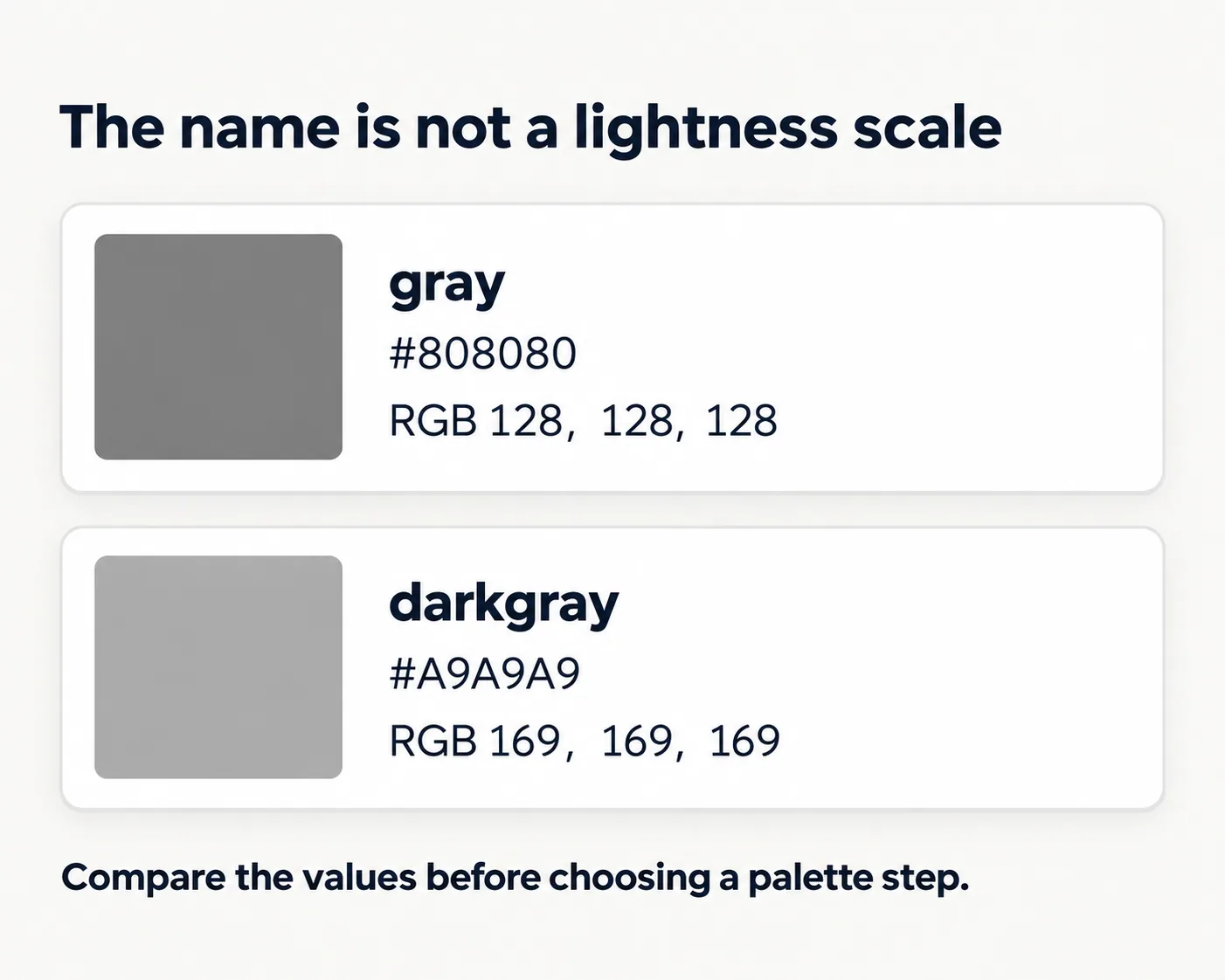
Both examples above have equal red, green, and blue channels, so this comparison is easy to inspect. It does not turn RGB channel numbers into a general perceptual scale for unrelated colors. The useful lesson is narrower: the label alone does not tell you where a swatch belongs in your interface.
When organizing existing declarations, sort or compare the actual values before assigning a sequence. If you need a deliberate surface ramp, document the chosen steps explicitly. A collection of conveniently named grays can be a starting reference, but it does not supply the spacing, role choices, or review that a ramp needs.
Keep special and system keywords in context
A CSS color declaration can also use keywords that behave differently from an opaque named swatch. Hue Codex separates Special keywords and System color keywords from the fixed-name group so their meaning remains visible during lookup and export.
| Keyword | Meaning | Useful review question |
|---|---|---|
| transparent | Fully transparent black, with zero alpha. | What will show through this painted area? |
| currentColor | Uses the same element’s color property. | Which declaration sets that element’s text color? |
| Canvas / CanvasText | System colors for document content background and text. | How does this behave with the user’s browser and system settings? |
Transparent is not a white swatch. CurrentColor has no single standalone HEX equivalent, and system colors should not be frozen into one captured screenshot value. A value observed in one browser setup describes that context; it does not replace the keyword’s behavior.
Try searching currentcolor in the Special keywords group and choose JSON data. Hue Codex exports a description of the dynamic keyword without inventing a fixed HEX value. This is a useful check when collecting tokens: preserve a dependency or system meaning when that is what the original CSS intended.
Give a chosen value a job in your CSS
A semantic token names a role, such as notice accent, instead of prescribing a particular purple forever. A custom property can hold a named color today and a numeric color value later while the component keeps referring to the same role.
The following CSS is an illustrative starting pattern for an element with class notice. It sets the text color from one custom property and makes the inline-start border follow that text color. Layout, background selection, and the finished component’s contrast still need review in their actual placement.
:root {
  --notice-accent: rebeccapurple;
}

.notice {
  color: var(--notice-accent);
  border-inline-start: 0.25rem solid currentColor;
  padding-inline-start: 1rem;
}
In the Hue Codex reference, filter to rebeccapurple and select CSS variables under Export. The filtered output provides the fixed value for your notes. Assign it to the role name you chose; the lookup tool cannot decide whether that purple belongs to a notice, navigation, or a chart series.
Do not force a brand value to its nearest named color merely to make the CSS shorter. If the required value has no exact name, use its numeric notation. The CSS Color Formats guide explains the available representations; choose one that preserves the intended value and is practical for the handoff.
Questions that come up during a color audit
Are CSS color names case-sensitive?
Named-color keywords are case-insensitive, so RebeccaPurple and rebeccapurple specify the same color. Custom-property names are case-sensitive: --notice-accent and --Notice-Accent are different names. Pick a consistent spelling for readable source files.
Can I invent a new CSS color name?
A custom word does not become a predefined color keyword. Define a custom property such as --notice-accent and reference it through var(--notice-accent) to give your chosen value a reusable project-specific name.
Does an equivalent HEX value produce a different color?
For a fixed opaque named color, its prescribed six-digit HEX value specifies the same sRGB color. Replacing rebeccapurple with #663399 changes notation, not the specified value. This equivalence does not give currentColor or system keywords a universal fixed HEX replacement.
Audit one component before renaming the palette
Choose one stylesheet and list its color declarations with their component roles. Resolve fixed names, flag aliases, and keep dynamic keywords in a separate review group. Rename a shared role only when its uses should change together. The result is a small, explainable mapping from existing CSS to intended behavior that you can carry into the next component.
Spot an issue or want a color topic covered?Send a correction or request a post.