
Color guide
CSS color formats guide
CSS color syntax now covers much more than HEX, RGB, and HSL. Modern CSS can express named colors, alpha transparency, perceptual color spaces, wide-gamut colors, color mixing, relative colors, light and dark scheme choices, and reusable color roles. The best format depends on the job: compatibility, readability, color editing, palette generation, accessibility, and production support.
Short answer
CSS color formats are the valid syntaxes CSS can use to represent color values, including keywords, HEX, rgb(), hsl(), hwb(), lab(), lch(), oklab(), oklch(), color(), color-mix(), relative colors, currentColor, transparent, and light-dark(). Use simple sRGB formats for broad familiarity, HSL or HWB for quick human edits, OKLCH or OKLab for perceptual scale work, color() for explicit color spaces such as display-p3, and semantic custom properties for reusable color roles.
- HEX, rgb(), and hsl() remain the most familiar CSS color formats for ordinary sRGB colors.
- Modern CSS uses space-separated component syntax with slash alpha, such as rgb(65 105 225 / 72%) and hsl(225 73% 57% / 72%).
- HWB can feel intuitive for tint and shade style edits because it exposes whiteness and blackness.
- Lab, LCH, OKLab, and OKLCH are useful when perceptual lightness, chroma, and smoother scales matter.
- The color() function can target explicit color spaces such as display-p3 for wide-gamut work.
- color-mix() and relative color syntax can derive variants, but production systems should still store approved role tokens.
- Color format does not decide accessibility. Contrast depends on the final foreground and background colors.
- Use fallbacks and support checks when modern color syntax must serve older browsers or strict compatibility requirements.
Standards status
Badges mark whether this guide relies on stable standards, draft or preview specifications, primary or model sources, Hue Codex guidance, approximations, or browser-dependent behavior.
What CSS color formats are
A CSS color format is a valid way to write a color value in CSS. Some formats are compact, such as HEX. Some expose familiar channels, such as rgb(). Some expose human-friendly hue or whiteness controls, such as hsl() and hwb(). Some expose perceptual dimensions, such as lab(), lch(), oklab(), and oklch(). Some target explicit color spaces, such as color(display-p3 ...).
The format is notation, not a guarantee of quality. A color can be written as HEX, RGB, HSL, OKLCH, or a token and still be too low contrast, off brand, hard to maintain, or unsupported for your audience. Good CSS color work chooses syntax for the workflow and tests the final result in context.
A CSS color format is a standards-defined syntax that can represent a color value in CSS, from keywords and HEX notation to modern color functions, color-space functions, and dynamic color expressions.
Quick decision guide
You do not need one format for everything. Mature websites often use several CSS color formats on purpose: compact HEX in exported roles, rgb() for overlays, hsl() for hand-authored adjustments, OKLCH for scale design, and color() for wide-gamut color values.
| Format | Best for | Example |
|---|---|---|
| Named colors | Tiny demos, prototypes, browser defaults, currentColor inheritance | red, transparent, currentColor |
| HEX | Compact sRGB brand values, static tokens, design handoff | #4169e1 or #4169e1cc |
| rgb() | Channel values, alpha overlays, generated color output | rgb(65 105 225 / 72%) |
| hsl() | Manual hue, saturation, and lightness edits | hsl(225 73% 57%) |
| hwb() | Whiteness and blackness adjustments around a hue | hwb(225 25% 12%) |
| lab() | Perceptual lightness with a and b opponent axes | lab(54% 45 -83) |
| lch() | Perceptual lightness, chroma, and hue in CIE Lab space | lch(54% 94 295) |
| oklab() | Modern perceptual rectangular color coordinates | oklab(0.58 0.05 -0.24) |
| oklch() | Modern perceptual lightness, chroma, and hue scales | oklch(0.56 0.188 266.4) |
| color() | Explicit color spaces and wide-gamut values | color(display-p3 0.95 0.38 0.2) |
| color-mix() | Derived tints, shades, tones, and state variants | color-mix(in oklab, var(--brand) 80%, white) |
| light-dark() | Scheme-aware color choice for light and dark modes | light-dark(#ffffff, #10151f) |
CSS color format map
The modern CSS color toolbox is easier to understand when it is grouped by purpose. Keywords are readable but limited. sRGB formats are familiar and widely supported. HSL and HWB expose channels that humans can edit. Lab, LCH, OKLab, and OKLCH support more perceptual reasoning. color() makes the color space explicit. color-mix(), relative colors, currentColor, and light-dark() help colors respond to context.
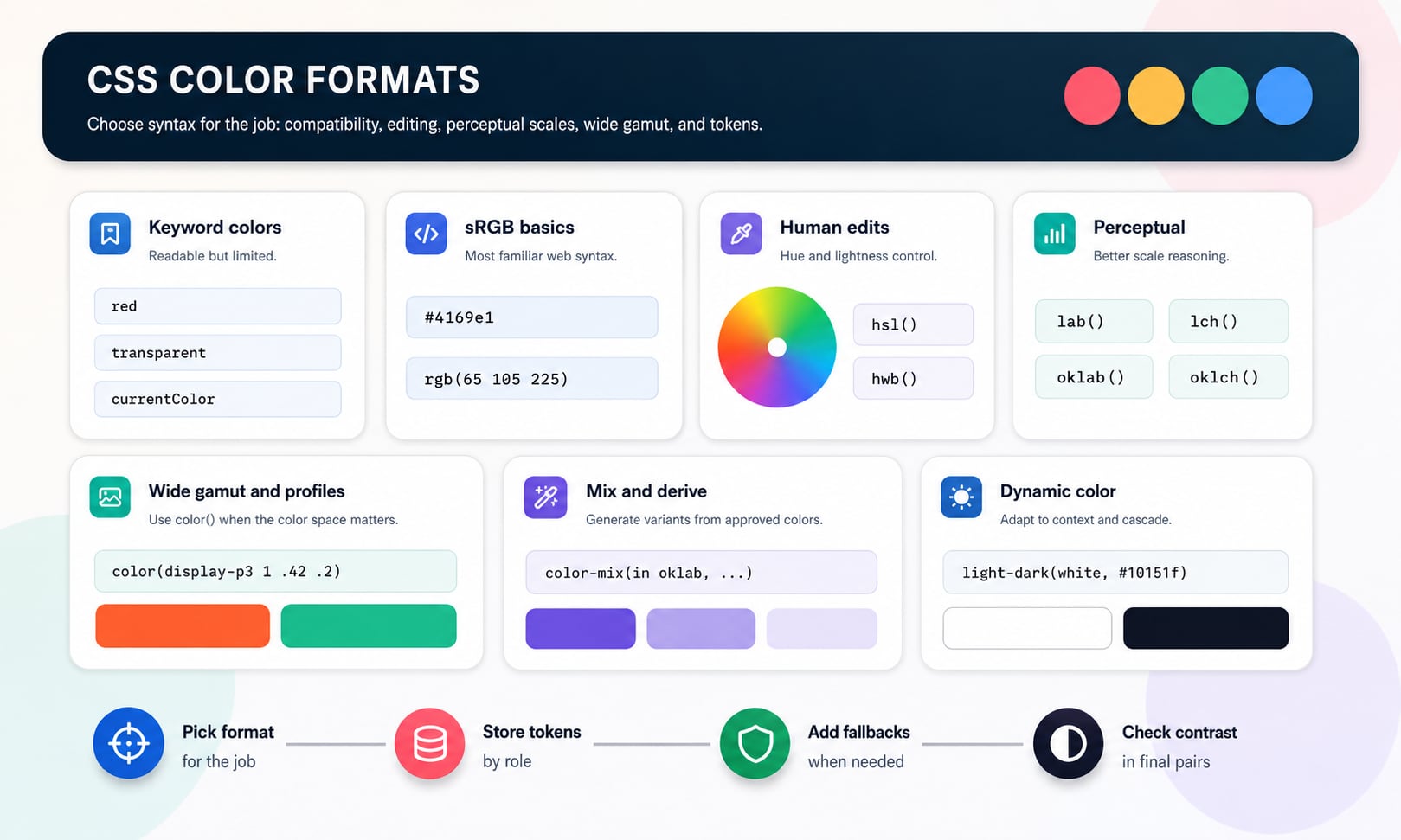
Named colors, transparent, and currentColor
CSS includes named color keywords such as red, blue, white, black, rebeccapurple, and many others. Named colors are readable and useful in demos, but they are rarely precise enough for brand systems because the names do not describe design intent, accessibility pairings, or token roles.
Two special keywords matter in production CSS. transparent represents a fully transparent color. currentColor resolves to the computed value of the color property, which makes borders, icons, outlines, and decorations inherit the current text color without repeating the value.
Named colors
Use for quick examples and simple prototypes, not as the main vocabulary of a serious brand system.
transparent
Use when the color should have zero alpha. Remember that transparent layers visually depend on what sits behind them.
currentColor
Use for SVG icons, borders, focus outlines, text decorations, and components that should follow the text color.
HEX notation
HEX is the compact hash-prefixed notation most design tools and web tools recognize. Six-digit HEX stores red, green, and blue channel values as hexadecimal pairs. Eight-digit HEX adds alpha at the end. Short forms such as #rgb and #rgba duplicate each digit.
HEX is excellent for stable sRGB values because it is short, copyable, and common in brand guides and design tools. It is weaker when humans need to understand alpha, manipulate channels, or derive related colors directly in CSS.
| Syntax | Meaning | Example |
|---|---|---|
| #rgb | Short red, green, blue | #36f means #3366ff |
| #rgba | Short red, green, blue, alpha | #36fc means #3366ffcc |
| #rrggbb | Full red, green, blue | #4169e1 |
| #rrggbbaa | Full red, green, blue, alpha | #4169e1cc |
HEX represents sRGB channel values. It is not a perceptual color model and it does not expose hue, lightness, or chroma directly.
rgb() and alpha syntax
rgb() writes red, green, and blue channels directly. Modern CSS syntax separates components with spaces and uses a slash before alpha. Legacy comma syntax remains common in older snippets, and rgba() remains supported as a legacy-style alias of rgb().
RGB is practical when code generates colors, when channel values matter, or when opacity needs to be visible in the CSS. It is less pleasant for humans who want to make a color warmer, cooler, lighter, darker, or more muted by hand.
| Syntax | Meaning | Use |
|---|---|---|
| rgb(65 105 225) | Modern opaque RGB | Clean authored CSS |
| rgb(65 105 225 / 72%) | Modern RGB with alpha | Overlays, shadows, disabled states, state layers |
| rgb(65, 105, 225) | Legacy comma RGB | Older snippets and tutorials |
| rgba(65, 105, 225, 0.72) | Legacy alpha form | Compatibility with older authoring habits |
hsl() for human-editable hue, saturation, and lightness
hsl() separates hue, saturation, and lightness. That makes it easier to adjust a color by hand than HEX or RGB. A designer can rotate a hue, reduce saturation, or lower lightness without mentally calculating red, green, and blue channels.
HSL is convenient, but it is not perceptually uniform. Equal lightness values in HSL do not always look equally light across hue families, and equal steps do not automatically produce a balanced UI scale. Use HSL for fast edits, not as proof that a scale is visually even.
Hue
The color-family angle around the HSL color wheel, where red is near 0 degrees, green near 120 degrees, and blue near 240 degrees.
Saturation
The intensity channel in HSL. Lower saturation moves the color toward gray.
Lightness
The HSL lightness axis. 0% is black, 100% is white, and 50% is often the vivid midpoint for many hues.
hwb() for whiteness and blackness
hwb() expresses color as hue, whiteness, and blackness. It can feel intuitive for tint and shade thinking because the channels directly describe how much white and black are mixed with a hue direction.
HWB is useful for readable experiments and palette education. For detailed production scales, OKLCH or OKLab often gives better perceptual control, but HWB remains a helpful bridge between traditional color language and CSS.
| Format | Channels | Practical feel |
|---|---|---|
| hsl() | Hue, saturation, lightness | Good for quick hue and lightness edits |
| hwb() | Hue, whiteness, blackness | Good for tint-like and shade-like reasoning |
| oklch() | Lightness, chroma, hue | Good for more perceptual design-system scales |
lab(), lch(), oklab(), and oklch()
Lab and LCH are based on CIE Lab color. OKLab and OKLCH are newer perceptual spaces designed to behave better for modern color manipulation. These formats are useful when you want color changes to track more closely with how people perceive lightness and colorfulness.
LCH and OKLCH are especially friendly for design-system thinking because they expose lightness, chroma, and hue. Lightness controls how light or dark a color appears, chroma controls colorfulness, and hue controls the color family. OKLCH is often a strong choice for modern UI scales because it is easier to reason about pale surfaces, vivid accents, and dark foregrounds together.
lab()
Uses perceptual lightness with a and b opponent axes. Useful, but less intuitive to hand edit than LCH.
lch()
Uses lightness, chroma, and hue based on CIE Lab. More human-readable than Lab for many palette tasks.
oklab()
Uses OKLab rectangular coordinates. Useful for interpolation and color math.
oklch()
Uses OKLab lightness, chroma, and hue. Often the clearest modern format for perceptual UI palette work.
CSS Lab and LCH use D50-adapted CIE Lab, while sRGB and OKLab or OKLCH are commonly associated with D65-based workflows. Good conversion tools handle white-point adaptation instead of treating every space as interchangeable.
color() and explicit color spaces
The color() function lets CSS identify a color space explicitly. That matters for wide-gamut design because an sRGB value and a display-p3 value can use similar-looking numeric components while referring to different gamuts.
Use color() when the color space itself is part of the decision. A brand color intended for Display P3, for example, should not be documented as if it were ordinary sRGB. Production systems may still need fallbacks for devices or browsers that cannot display the wider-gamut value.
| Syntax | Meaning | Practical note |
|---|---|---|
| color(srgb 0.24 0.35 1) | sRGB channels from 0 to 1 | Explicit but usually less familiar than rgb() or HEX |
| color(display-p3 0.95 0.38 0.2) | Display P3 color | Useful for wide-gamut screens with fallback planning |
| color(display-p3 0.95 0.38 0.2 / 80%) | Display P3 with alpha | Wide-gamut color with transparency |
color-mix() and relative colors
color-mix() creates a color by mixing two colors in a chosen color space. That makes it useful for tint, shade, tone, hover, focus, and subtle background variants. The selected interpolation space matters: mixing in sRGB can look different from mixing in OKLab or OKLCH.
Relative color syntax lets one color be derived from another by referencing its channels. It can be powerful for systematic variants, but production teams should still review final values for contrast, gamut, and visual fit. Generated color logic is a helper, not a replacement for palette approval.
| Goal | Example | Reminder |
|---|---|---|
| Tint-like surface | color-mix(in oklab, var(--brand) 18%, white) | Check text contrast against the surface |
| Shade-like hover | color-mix(in oklab, var(--brand) 82%, black) | Make sure the hover still fits the brand |
| Tone-like muted accent | color-mix(in oklab, var(--brand) 55%, gray) | Muted colors can lose category separation |
| Relative OKLCH edit | oklch(from var(--brand) calc(l + .08) c h) | Support and fallback strategy may be needed |
light-dark(), color-scheme, and theme-aware color
light-dark() lets a CSS value choose between two colors depending on the used color scheme. It is useful when a component needs one value in light mode and another in dark mode without duplicating every rule manually.
Theme-aware color still needs contrast checks. A dark-mode value should not be assumed accessible because it is darker, and a light-mode value should not be assumed readable because it is familiar. Test the final pairs in both schemes.
Light value
The first light-dark() argument is used when the element resolves to a light color scheme.
Dark value
The second argument is used for dark color scheme contexts.
Token strategy
For larger systems, pair light-dark() with semantic tokens so components consume roles rather than raw colors.
Alpha, opacity, and transparent layers
Alpha is part of a color value. Opacity is a property that affects the entire element and its descendants. That difference matters. A semi-transparent background color can leave text fully opaque, while opacity: .5 makes the text, icons, borders, and children fade too.
Modern CSS color functions use slash alpha, such as rgb(0 0 0 / 50%), hsl(0 0% 0% / .5), and oklch(0.56 0.188 266.4 / 70%). HEX can also encode alpha with eight digits, but that is often harder to read.
Use color alpha for layers
Use slash alpha when only the color itself should be transparent.
Use opacity sparingly
Opacity fades the entire element. It can accidentally weaken text and icons.
Avoid hidden contrast changes
Transparent colors visually combine with backgrounds, so test the final composited pair.
Browser support and fallback strategy
Older CSS color formats are broadly familiar and widely supported. Newer formats such as OKLCH, relative colors, color-mix(), display-p3, and light-dark() may require a support strategy depending on the audience, browser matrix, and risk tolerance.
The safest pattern is progressive enhancement: provide a simple fallback first, then override it with modern syntax when supported. For color roles, keep final approved values documented so generated or modern CSS does not become the only source of truth.
| Need | Pattern | Example |
|---|---|---|
| Modern single color | Fallback declaration first | color: #4169e1; color: oklch(0.56 0.188 266.4); |
| Feature-gated syntax | @supports around modern rule | @supports (color: oklch(0.6 0.2 240)) { ... } |
| Wide gamut | sRGB fallback plus display-p3 override | background: #ff6b4a; background: color(display-p3 1 .38 .22); |
| Derived colors | Store approved fallback tokens | --brand-hover: #243fd6; --brand-hover: color-mix(...); |
CSS custom properties and color roles
CSS custom properties are not themselves a color format. They are variables that can store any valid CSS value, including a color. A variable can hold HEX, rgb(), hsl(), OKLCH, color-mix(), or a semantic alias to another variable.
For production systems, name tokens by role rather than only by appearance. A token such as --color-action-primary-bg communicates use. A token such as --blue-500 may still be useful in a palette scale, but components should usually consume semantic roles.
| Token | Value type | Why it helps |
|---|---|---|
| --color-brand-base | #4169e1 | Stable canonical brand value |
| --color-action-primary-bg | oklch(0.56 0.188 266.4) | Semantic action role with perceptual coordinates |
| --color-action-primary-hover | color-mix(in oklab, var(--color-action-primary-bg) 82%, black) | Derived interaction state |
| --color-action-primary-text | #ffffff | Approved foreground for the action background |
| --color-surface-page | light-dark(#ffffff, #10151f) | Theme-aware surface role |
Accessibility and contrast
Color format does not determine accessibility. Equivalent values written as HEX, rgb(), hsl(), or OKLCH will have the same contrast behavior when rendered as the same final color. Accessibility depends on the final foreground and background pair, the UI state, text size, non-text contrast, and whether color is the only cue.
Modern formats can make it easier to build thoughtful scales, but they do not remove the need to check contrast. A beautiful OKLCH token can still fail on a tinted surface. A Display P3 accent can still be too close to its background. A color-mix() hover state can still be unreadable.
Test the final pair
Check text, icon, border, focus, and chart contrast after alpha, overlays, gradients, and theme rules are applied.
Do not rely on hue only
Status, errors, links, required fields, selected states, and charts need labels, icons, underlines, or other non-color cues.
Document approved pairings
Store text/background pairs and contrast metadata where teams can reuse them safely.
Common CSS color format mistakes
Most color-format mistakes come from choosing syntax for fashion instead of maintenance. Modern CSS color is powerful, but every format should make the system easier to understand, not harder.
Mistake: using OKLCH everywhere without fallbacks
OKLCH is excellent for many scales, but compatibility and token export requirements still matter.
Mistake: treating HSL as perceptually even
HSL is convenient for hand edits, but equal HSL steps can look uneven across hues.
Mistake: using opacity instead of alpha color
Opacity affects the whole element and can make text or icons too faint.
Mistake: storing only decorative scale names
A role token such as color.warning.text is harder to misuse than yellow-700 alone.
Mistake: forgetting gamut
Wide-gamut colors may clip or convert differently on displays and workflows that only handle sRGB.
Mistake: skipping contrast because the syntax is modern
Modern color functions can create inaccessible colors just as easily as old formats.
A practical CSS color workflow
A durable color system usually separates exploration from production. Explore with the format that helps you reason: HSL for quick hue movement, OKLCH for perceptual scale tuning, color-mix() for candidate variants, and color() for wide-gamut experiments. Then approve final roles and store them as tokens.
The output can still include multiple formats. Documentation may show HEX for quick copying, CSS may use OKLCH for modern browsers, and exported JSON may include RGB channels for other systems. The important part is that all formats point back to one approved color decision.
- Choose the color role first: text, surface, border, action, hover, focus, warning, success, danger, chart, or brand accent.
- Choose the authoring format that makes the role easiest to adjust and explain.
- Define fallback values if the syntax is modern or wide gamut.
- Check contrast for every real foreground/background pair.
- Name final tokens by role and document allowed pairings.
- Export additional formats from the canonical token instead of hand-maintaining parallel values.
How Hue Codex uses CSS color formats
Hue Codex treats CSS color formats as connected views of a color system. A color can be picked visually, converted across HEX, RGB, HSL, HWB, Lab, LCH, OKLab, and OKLCH, checked for contrast, placed into a palette role, and exported as CSS or role-ready data.
That workflow matters because color syntax is only one layer. The real production question is whether the color has a clear role, a readable foreground, a stable fallback, accessible states, and documentation that a whole team can interpret correctly.
Sources and further reading
This guide is written from practical CSS and design-system usage and cross-checked against primary CSS Color, MDN, and WCAG references.
Try it in Hue Codex
Use the free tools to test the idea immediately: pick a color, convert it, generate harmonies, build tints and shades, check contrast, and export practical CSS or palette data.
Quick answers
CSS color formats guide FAQ
What are CSS color formats?
CSS color formats are the valid syntaxes CSS can use to represent color values, including keywords, HEX, rgb(), hsl(), hwb(), lab(), lch(), oklab(), oklch(), color(), color-mix(), relative colors, transparent, currentColor, and light-dark().
Which CSS color format should I use?
Use HEX for compact static sRGB values, rgb() for channel values and alpha overlays, hsl() or hwb() for quick human edits, OKLCH or OKLab for perceptual scale work, and color() for explicit color spaces such as display-p3. Use semantic tokens for production roles.
Is HEX better than RGB or HSL?
No. HEX, RGB, and HSL are different notations. HEX is compact, RGB exposes channels and alpha clearly, and HSL is easier to adjust by hand. The best format depends on the workflow.
What is modern CSS color syntax?
Modern CSS color syntax generally uses space-separated components and slash alpha, such as rgb(65 105 225 / 72%), hsl(225 73% 57% / 72%), and oklch(0.56 0.188 266.4 / 70%).
What is currentColor in CSS?
currentColor is a CSS keyword that resolves to the computed value of the color property. It is useful for borders, icons, outlines, and decorations that should follow text color.
What is transparent in CSS?
transparent is a CSS color keyword for a fully transparent color. The visual result depends on the background behind it because transparency composites with whatever is underneath.
What is the difference between hsl() and hwb()?
hsl() uses hue, saturation, and lightness. hwb() uses hue, whiteness, and blackness. HSL is common for quick hue and lightness edits, while HWB can feel intuitive for tint-like and shade-like adjustments.
What is OKLCH in CSS?
OKLCH is a modern perceptual CSS color format with lightness, chroma, and hue channels. It is often useful for UI color scales because those channels map more clearly to human color decisions than raw RGB channels.
What is color() in CSS?
color() is a CSS function that can express colors in explicit color spaces, such as srgb or display-p3. It is useful when the color space is part of the design or wide-gamut strategy.
What is color-mix() in CSS?
color-mix() creates a color by mixing two colors in a chosen color space. It is useful for derived states such as tints, shades, tones, hover colors, and subtle surfaces.
Are CSS variables a color format?
No. CSS custom properties are variables. They can store colors written in any valid CSS color format, but the variable itself is not a color format.
Does CSS color format affect accessibility?
No. Accessibility depends on the final rendered foreground and background colors, especially contrast and non-color cues. Equivalent colors have the same contrast behavior regardless of notation.
Should color roles use HEX or OKLCH?
Use whichever format best serves the color workflow. HEX is compact and familiar for stable sRGB values. OKLCH is better for perceptual scale work. Many systems store canonical values and export multiple formats.
Do I need fallbacks for modern CSS color formats?
Use fallbacks when your browser support requirements include environments that may not support the modern syntax. A common pattern is to declare a simple fallback first, then override with OKLCH, color(), color-mix(), or light-dark() when supported.