
Quick answer
A manual image eyedropper lets you choose a location in an image and inspect its color. In Hue Codex, Exact pixel reads one browser-decoded source pixel, while 3×3 and 5×5 modes average nearby RGBA channels. Use exact sampling for a specific pixel and averaging for a local mixture; keep the coordinates and sample size with the result.
A tiny orange detail sits inside a blue image. Click it with an eyedropper and you expect orange. Switch to an averaged sample at the same location and the result becomes blue. Neither reading needs to be a mistake: one describes the selected pixel, while the other describes a neighborhood that contains mostly blue.
This tutorial uses a deliberately simple practice image to make that difference measurable. You will pin three readings at one source coordinate, compare the results, and export enough context to repeat the measurement. It requires a browser and the supplied PNG; no image editor or code is needed.
1. Open the practice file in the manual image eyedropper
Save the practice PNG to your device. It is a 64-by-64 image filled with opaque #2060A0 blue, except for one opaque #D45C2C orange pixel at x 32, y 32. Coordinates start at zero in the upper-left corner. Preserve the original file: resizing it or taking a screenshot creates a different set of pixels.
Open the Image Eyedropper and choose that saved PNG under Image file. Confirm the source dimensions are 64 × 64, then choose Exact pixel under Sample. The tool reads the selected file locally in the browser. Its displayed image can be larger than the source; the reported x and y still refer to the decoded source image.
Tab to the image sampler and use the arrow keys until the cursor details show x 32, y 32. On a freshly loaded practice file, keyboard selection starts at x 31, y 31, so one Right Arrow and one Down Arrow reach the orange pixel. Confirm the coordinates before pressing Enter to pin it. You can also lock a starting point by clicking or tapping and refine it with the pixel nudge controls.
2. Change the sample window while keeping the location
The exact sample should be #D45C2C. Change Sample to 3x3 average, return to the same source coordinate, and pin another reading. Repeat with 5x5 average. Check x 32, y 32 each time; moving the center would change both the location and the sampling method at once.
| Sample mode | Pixels included | Result |
|---|---|---|
| Exact pixel | One orange pixel | #D45C2C · RGB 212, 92, 44 |
| 3x3 average | One orange pixel and eight blue pixels | #346093 · RGB 52, 96, 147 |
| 5x5 average | One orange pixel and 24 blue pixels | #27609B · RGB 39, 96, 155 |
The larger window gives the surrounding blue more weight. For the red channel in the 3×3 sample, Hue Codex computes (212 + 8 × 32) ÷ 9 = 52. The green and blue channel means round to 96 and 147. The same arithmetic over 25 pixels gives the 5×5 result. All pixels here are opaque, so alpha stays at 100%.
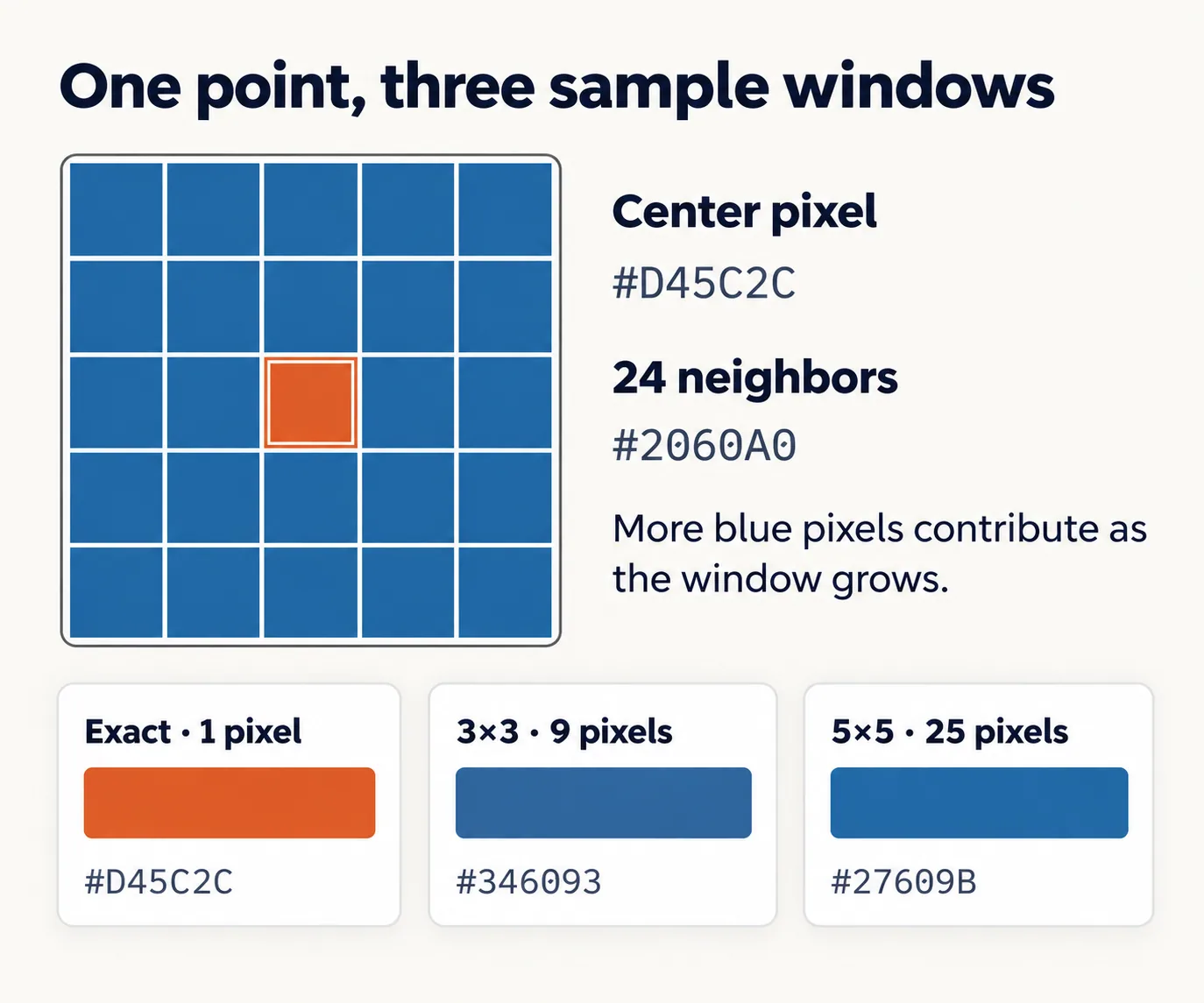
The average colors do not occur anywhere in this two-color source file. They are calculated mixtures, not hidden pixels that the tool found. This averaging uses the decoded channel values; it is not a perceptual color average or a method for recovering the original brand color behind an image.
3. Choose a mode that answers the actual question
| What you need | Starting mode | What to review |
|---|---|---|
| The value of one known source pixel | Exact pixel | Confirm its coordinates and avoid accidentally sampling a neighboring edge. |
| A local estimate across small texture or noise | 3x3 average | Check that all included pixels belong to the intended area. |
| A broader local mixture | 5x5 average | Expect small details and boundaries to contribute less individually. |
For an opaque flat fill, sample well inside the shape. Near its boundary, an average may combine the fill with its surroundings. On a photograph, an average can be a useful local estimate, but it cannot remove the lighting and shading already recorded in the image. Match the measurement to the decision instead of treating the largest window as automatically more accurate.
Loupe zoom and sample size are separate controls. Enlarging the loupe helps you inspect the neighborhood; Sample determines which pixels contribute to the reading. For a quick check, return to Exact pixel and move one source pixel right from the orange point. At x 33, y 32, the result is the original blue, #2060A0.
Sample windows near an image edge are clipped to the source bounds, so a nominal 5×5 window can include fewer than 25 pixels there. The Image Sampling and Processing Methodology explains this boundary rule and how screen positions map to source coordinates. Keep the test point away from edges when comparing the full window sizes.
4. Export the measurement, not just the HEX code
Choose JSON data under Export after pinning the three readings. For each sample, keep hex, rgb, alpha, coordinates, and sampleSize. The top-level sampleMode describes the current setting; the per-sample sampleSize records how each pinned reading was taken. The newest sample appears first, so identify records by their coordinates and sample size rather than assuming capture order.
Store that export with the unchanged practice file, or with your own source-image revision. A HEX value alone cannot tell a colleague whether it came from one pixel, an averaged patch, or a different location. Changing the crop, orientation, or image dimensions can also make old coordinates point somewhere else.
For real images, “exact” means the pixel exposed by the browser’s decoding and canvas workflow. It does not promise the original design token, an ICC-profile measurement, or identical readings from every application. Transparent pixels add another distinction: the sample’s color and alpha are separate from how it looks over a background. This opaque fixture avoids that extra variable.
The tool’s best-text guidance is scoped to the sample composited on its stated canvas background. If you plan to use the color in an interface, review the actual foreground, background, and purpose separately. A successful sampling exercise does not establish that the resulting color is suitable for text or a control.
Questions about manual samples
Why can an average return a color absent from the image?
It combines channel values from several pixels. In the practice file, only blue and orange exist, but their local averages create two additional RGB values.
Does increasing loupe zoom change the sampled color?
No. The loupe enlarges the inspection view. The source coordinate and Sample setting determine the reading; check those if the value changes.
Should I use this to recover an official logo color?
Use the original brand specification or source artwork when available. Sampling can document what a particular raster file contains, but a screenshot, edge pixel, or average is not proof of the intended brand value.
Keep a repeatable sample record
Try the three modes on one small area of your own image. Save the file revision, coordinate, sample size, color, and alpha together, then write one sentence explaining why that measurement fits the task. That record makes a manual pick reproducible and keeps an averaged estimate from being mistaken for an exact source pixel.
Spot an issue or want a color topic covered?Send a correction or request a post.