Quick answer
Hue angle is the number of degrees around a color model's hue circle. In CSS HSL, 0deg and 360deg meet at red, with green and blue roughly one-third and two-thirds around the circle; in OKLCH, the hue angle is interpreted inside OKLab-based coordinates, so the same number is not guaranteed to look identical across models.
Hue angle meaning sounds more technical than it needs to be. A hue angle is the direction of a color around a circular color model. Instead of saying only red, yellow, green, cyan, blue, or magenta, a hue angle gives that direction a number.
That number is useful in CSS, design tokens, palette tools, and color documentation, but it is not a finished color. A hue angle still needs a model, lightness, saturation or chroma, contrast, and a role before it becomes useful in an interface or brand system.
What Hue Angle Means
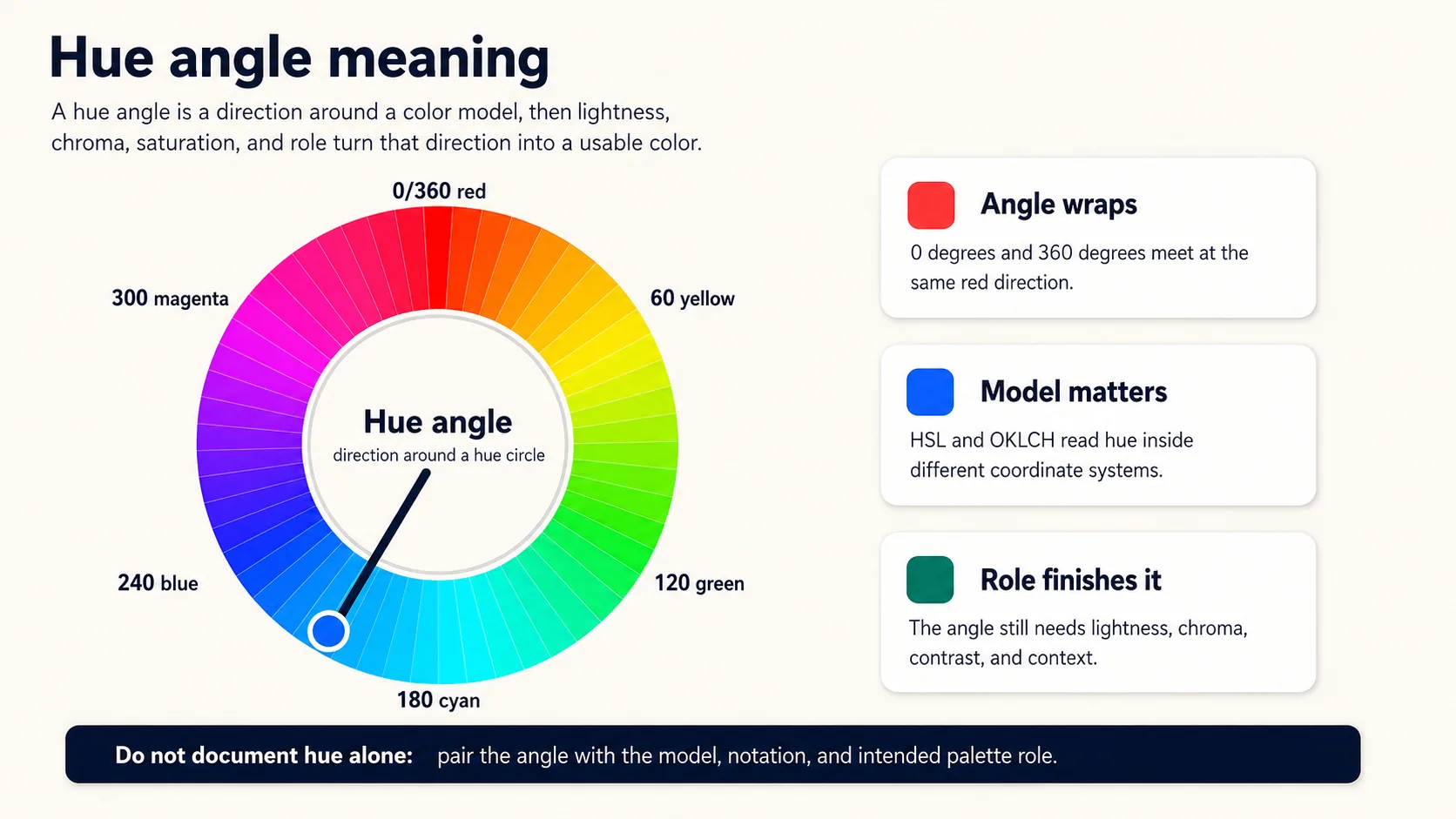
A hue angle is measured in degrees around a hue circle. In the familiar HSL-style wheel, 0deg and 360deg meet at red, 60deg points toward yellow, 120deg toward green, 180deg toward cyan, 240deg toward blue, and 300deg toward magenta. The circle wraps, so 370deg lands in the same direction as 10deg.
The guide to what hue means is the right foundation if you want the broader definition first. This post narrows the idea to numeric angles and how those angles should be documented in CSS and design-system work.
Hue Angle Is Not Enough by Itself
A hue angle only answers one question: which color family direction are we pointing toward? It does not say how light the color is, how vivid it is, whether it passes contrast, or whether it should be used for text, backgrounds, accents, charts, or alerts.
| Decision | What the hue angle tells you | What still needs to be chosen |
|---|---|---|
| Color family | The direction around a hue circle, such as red, green, blue, or a point between them. | The exact model and notation used to describe that direction. |
| Visual intensity | Nothing by itself. | Saturation in HSL, chroma in OKLCH, or another model-specific intensity dimension. |
| Readability | Nothing by itself. | The exact foreground, background, size, and contrast standard being checked. |
| Palette role | A possible direction for a brand, accent, state, or chart color. | Whether the color is decorative, semantic, interactive, structural, or content-bearing. |
HSL and OKLCH Use Hue Angles Differently
In CSS HSL, the hue angle belongs to an sRGB-based HSL model with saturation and lightness. In OKLCH, the hue angle belongs to an OKLab-based polar model with lightness and chroma. Both use hue angles, but the coordinate systems are different, so the same angle number should not be treated as a guaranteed visual match across both notations.
| Notation | Example | How to document it |
|---|---|---|
| HSL | hsl(210 88% 48%) | Record the angle with saturation and lightness because the angle alone is not the color. |
| OKLCH | oklch(0.62 0.17 252) | Record lightness, chroma, and hue together; do not assume the HSL angle is interchangeable. |
| Design token | brand.accent | Record the role, fallback value, and notation used for production CSS. |
The Hue Codex color converter is useful for inspecting a color across formats, while the CSS color formats guide gives broader notation context for HSL, OKLCH, LAB, LCH, RGB, and HEX values.
A CSS Token Pattern for Hue Angles
This illustrative CSS pattern keeps the model attached to the value. It uses a stable fallback first, then a newer OKLCH value where supported. The important part is the documentation: the HSL and OKLCH examples are not treated as the same color just because both include a hue angle.
:root {
  --brand-blue-fallback: #2563EB;
  --brand-blue-hsl: hsl(210 88% 48%);
  --brand-blue-oklch: oklch(0.62 0.17 252);
}

.primary-action {
  background: var(--brand-blue-fallback);
  background: var(--brand-blue-oklch);
  color: #FFFFFF;
}
Hue Codex Workflow
- Name the model first: HSL, OKLCH, LCH, HSV, HWB, or another color notation.
- Record the full color, not only the angle: hue plus saturation or chroma, lightness, and alpha when relevant.
- Use the converter to compare equivalent-looking values across formats instead of copying an angle blindly.
- Assign a role such as link, accent, surface, warning, chart series, or brand token.
- Check the exact foreground and background pair when the color carries text, icons, focus, or state meaning.
Common Mistakes
- Writing down a hue angle without naming the color model.
- Assuming 210deg in HSL and 210deg in OKLCH are interchangeable visual targets.
- Treating hue as enough information for accessibility or brand approval.
- Changing a hue angle to fix readability when the real issue is lightness, chroma, contrast, or role.
- Using color-wheel anchors as production values without testing them in the actual interface.
FAQ
Is hue angle the same as hue?
Hue is the color-family direction. Hue angle is a numeric way to describe that direction inside a circular color model.
What hue angle is red?
In the common HSL-style CSS wheel, 0deg and 360deg meet at red. Other color models can interpret hue angles differently.
Can I use the same hue angle in HSL and OKLCH?
You can write hue angles in both, but the same number should not be treated as a guaranteed visual match because HSL and OKLCH use different coordinate systems.
Does a hue angle tell me whether a color is accessible?
No. Accessibility depends on the actual foreground and background pair, text size, component role, non-color cues, and the standard being checked.
Final Takeaway
Hue angle meaning is simple once you keep the context attached: it is a degree direction around a color model. Use it to describe hue precisely, but never document it alone. As a next step, take one brand or UI color and record its full notation, model, role, fallback value, and the contrast pair where it is used.
Spot an issue or want a color topic covered?Send a correction or request a post.