Color guide
HEX vs RGB vs HSL
HEX, RGB, and HSL are three common ways to write colors for the web. They can describe the same sRGB color, but each format is better suited to a different design, development, or documentation task.
Short answer
HEX, RGB, and HSL are different CSS notations for color. HEX is compact and common in design handoff, RGB exposes red, green, blue, and alpha channels directly, and HSL separates hue, saturation, and lightness for easier manual adjustment. For standard web colors, all three usually describe colors in the sRGB color space.
- Use HEX when you need a short, familiar, copy-friendly brand or color-role value.
- Use RGB when code needs direct channel control, alpha transparency, canvas-style thinking, or numeric manipulation.
- Use HSL when humans need to adjust hue, saturation, or lightness by hand.
- Do not pick a format for accessibility. Contrast depends on the resulting foreground and background colors, not whether they were written as HEX, RGB, or HSL.
Standards status
Badges mark whether this guide relies on stable standards, draft or preview specifications, primary or model sources, Hue Codex guidance, approximations, or browser-dependent behavior.
The short version
HEX, RGB, and HSL are not competing color spaces in ordinary CSS usage. They are different ways to write color values. For common web colors, they resolve to sRGB colors that browsers can paint on screen.
The practical question is not "which one is more correct?" The better question is "which notation is easiest to read, edit, automate, document, or hand off for this job?"
| Format | Best for | Example |
|---|---|---|
| HEX | Compact brand values, color roles, handoff, static colors | #4169E1 |
| RGB | Channel math, alpha control, generated colors, canvas and image logic | rgb(65 105 225) |
| HSL | Manual color adjustment, hue rotations, quick light/dark variants | hsl(225 73% 57%) |
HEX, RGB, and HSL can describe the same color
A color such as #4169E1 can also be written as rgb(65 105 225) and approximately as hsl(225 73% 57%). The notation changes, but the intended visible sRGB color is the same.
This matters because teams often treat color-format debates as quality debates. HEX does not make a color more professional, RGB does not make it more accurate by itself, and HSL does not guarantee better palettes. The final color and its context matter more than the notation.
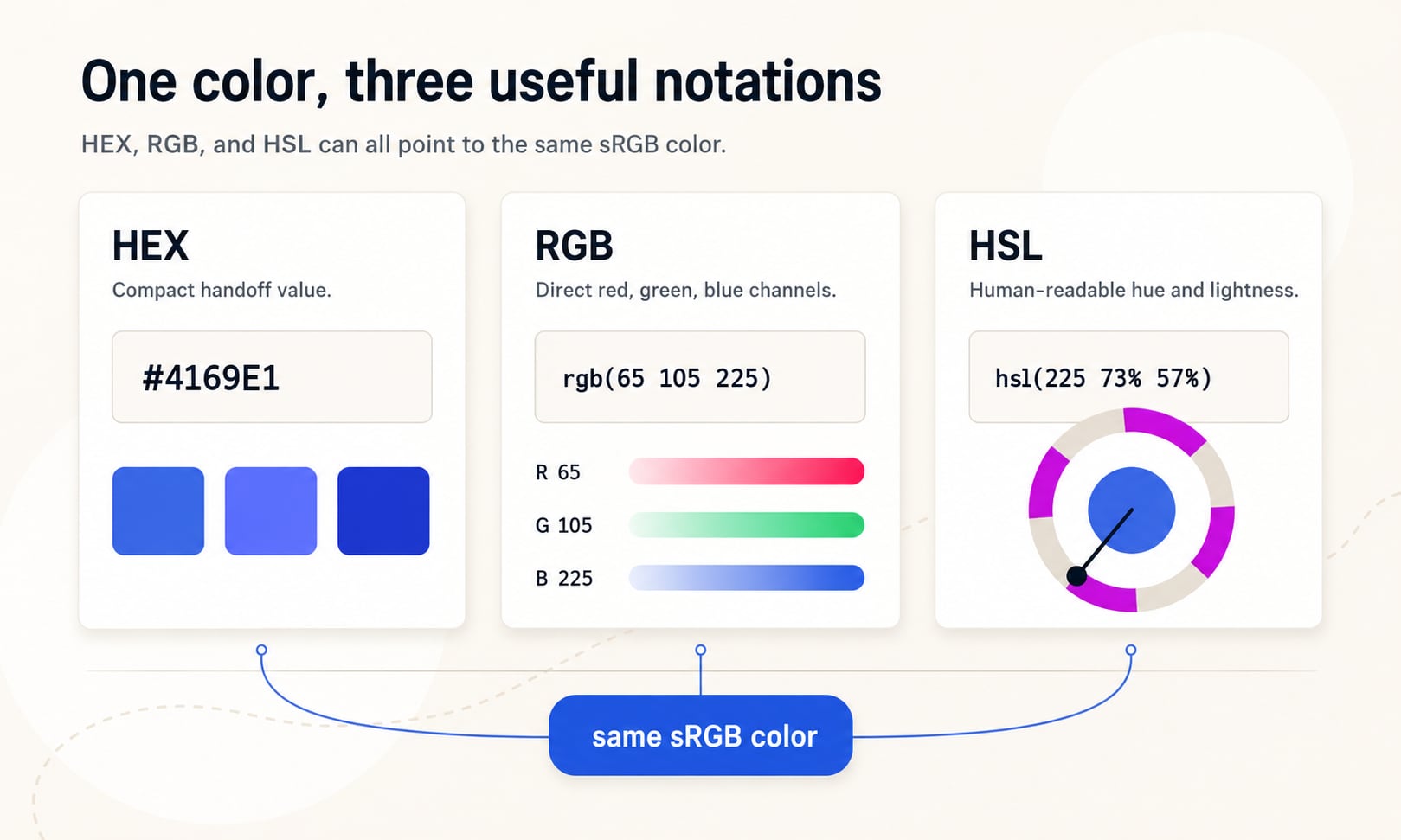
HEX is compact and familiar
HEX writes red, green, and blue channel values as hexadecimal digits after a hash symbol. The six-digit form uses two hexadecimal digits per channel: #RRGGBB. For example, #4169E1 means red 41, green 69, and blue E1 in hexadecimal.
Design tools, brand guides, CSS variables, and handoff documents often use HEX because it is short, stable, and easy to scan in lists of tokens. It is especially good for final approved colors that are not meant to be adjusted directly in the stylesheet.
Six digits
#RRGGBB is the most familiar form. It stores red, green, and blue as 00 through FF.
Eight digits
#RRGGBBAA adds alpha at the end, where 00 is transparent and FF is fully opaque.
Short forms
#RGB and #RGBA duplicate each digit, so #123 becomes #112233. They are compact but less precise.
RGB maps directly to screen channels
RGB writes a color as red, green, and blue channel values. In modern CSS, the preferred syntax is space-separated, such as rgb(65 105 225). Alpha transparency can be added with a slash: rgb(65 105 225 / 0.72).
RGB is useful when a color is generated, blended, or adjusted numerically. It is also intuitive for canvas pixels, image processing, light-emitting displays, or design tools that expose channel sliders.
| Syntax | Meaning | Use |
|---|---|---|
| rgb(65 105 225) | Modern RGB with red, green, and blue channels | Preferred clean CSS syntax |
| rgb(65 105 225 / 72%) | Modern RGB with alpha transparency | Transparent overlays, shadows, state layers |
| rgb(65, 105, 225) | Legacy comma-separated RGB | Older snippets and broad familiarity |
| rgba(65, 105, 225, 0.72) | Legacy alpha form; in modern CSS, rgba() is an alias of rgb() | Compatibility with older conventions |
HSL is easier to adjust by hand
HSL separates a color into hue, saturation, and lightness. Hue is the color family angle, saturation is vividness, and lightness is how light or dark the color appears within the HSL model.
That separation makes HSL convenient when you want to quickly test a lighter button color, a darker hover color, or a related hue. For example, hsl(225 73% 57%) can be made darker by reducing the lightness number without mentally converting red, green, and blue channels.
Hue
The color-family angle. Red is near 0 degrees, green near 120 degrees, and blue near 240 degrees in the familiar HSL wheel.
Saturation
The intensity of the color in HSL. Lower saturation moves toward gray; higher saturation is more vivid.
Lightness
The light/dark axis. 0% is black, 50% is the fully vivid midpoint for many hues, and 100% is white.
Syntax comparison
Modern CSS color functions use spaces between components and a slash before the optional alpha channel. Legacy comma syntax remains common and widely recognized, especially in older snippets and tutorials.
HEX has no function wrapper, so alpha is included by adding a fourth channel in the eight-digit form. RGB and HSL use a slash alpha term in modern CSS.
| Goal | HEX | RGB | HSL |
|---|---|---|---|
| Opaque color | #4169E1 | rgb(65 105 225) | hsl(225 73% 57%) |
| 72% opacity | #4169E1B8 | rgb(65 105 225 / 72%) | hsl(225 73% 57% / 72%) |
| Legacy style | #4169E1 | rgb(65, 105, 225) | hsl(225, 73%, 57%) |
| CSS variable value | --color-primary: #4169E1 | --color-primary: rgb(65 105 225) | --color-primary: hsl(225 73% 57%) |
The HSL numbers above are rounded for readability. Conversion tools may show slightly different rounded values depending on precision rules.
Which format should you use in production CSS?
Use the format that makes the color easiest to maintain. For stable tokens and brand documentation, HEX is often enough. For programmatic color output or opacity, RGB is very practical. For hand-authored adjustments, HSL is usually easier to reason about than HEX or RGB.
Many mature systems mix formats intentionally. A color-role file may store canonical values in HEX, component CSS may use RGB for alpha overlays, and exploratory styles may use HSL while teams are tuning hue or lightness.
Brand token
HEX is compact and familiar: --color-brand-primary: #4169E1.
Overlay or state layer
RGB is direct and alpha-friendly: background: rgb(65 105 225 / 12%).
Manual adjustment
HSL is easy to tune: hsl(225 73% 49%) is a darker version of the same HSL hue.
When not to use each format
No single notation is ideal for every job. Format choice can either clarify intent or hide it. The best format is the one that makes future edits less fragile.
| Format | Avoid when | Why |
|---|---|---|
| HEX | You need frequent opacity changes or channel math | Alpha and channel meaning are less obvious to humans. |
| RGB | You need quick perceptual color adjustment by hand | Changing red, green, and blue channels does not map cleanly to human color decisions. |
| HSL | You need perceptually even color scales | HSL lightness is convenient, but not perceptually uniform. OKLCH is often better for modern scale work. |
| Any format | You are choosing accessible text colors | Accessibility depends on contrast between final foreground and background colors. |
Alpha transparency in HEX, RGB, and HSL
All three approaches can express transparency, but RGB and HSL are easier to read when alpha matters. The slash syntax makes alpha visually separate from the color channels.
In HEX, alpha appears as a final hexadecimal pair. That is compact, but many people cannot quickly read #00000080 as 50% opacity without conversion. In RGB or HSL, rgb(0 0 0 / 50%) and hsl(0 0% 0% / 50%) are more self-explanatory.
HEX alpha
#RRGGBBAA keeps everything compact, but alpha is encoded as 00 through FF.
RGB alpha
rgb(65 105 225 / 0.72) is clear for overlays, state layers, and generated UI colors.
HSL alpha
hsl(225 73% 57% / 72%) keeps hue, saturation, lightness, and alpha readable together.
Conversion and rounding
Converting HEX to RGB is direct because both express red, green, and blue channels. Converting RGB to HSL involves a color-model calculation, so the result often includes rounded hue, saturation, and lightness values.
Rounding is normal. For design documentation, rounded HSL is usually easier to read. For programmatic conversion, keep enough precision to avoid drift if colors are repeatedly converted back and forth.
HEX to RGB
#4169E1 becomes red 65, green 105, blue 225.
RGB to HSL
rgb(65 105 225) becomes approximately hsl(225 73% 57%).
Precision rule
Store canonical token values once, then generate other notations from that source rather than hand-maintaining every format.
HEX, RGB, HSL, and accessibility
A color format does not determine whether a color is accessible. #4169E1, rgb(65 105 225), and hsl(225 73% 57%) represent the same color, so they have the same contrast behavior against the same background.
For readable text and UI states, test the final foreground/background pair. A color can be written beautifully and still fail contrast if it is too close in luminance to the background.
Format is notation
Changing notation does not improve contrast by itself.
Contrast is a pair property
The same blue may pass on white, fail on dark violet, and need a different text color on a tinted background.
Use tools after choosing
Convert formats for workflow, then check contrast for readability.
How Hue Codex uses HEX, RGB, and HSL
Hue Codex treats HEX, RGB, and HSL as connected views of the same color decision. The picker and converter help you move between notations, while the contrast, palette, and CSS tools help you decide whether the resulting color actually works.
That workflow matters because color systems are not just values. They need readable pairs, role names, state colors, export formats, and consistent documentation that teams can understand.
Sources and further reading
This guide is written from practical CSS and design-system usage and cross-checked against primary CSS color references.
Try it in Hue Codex
Use the free tools to test the idea immediately: pick a color, convert it, generate harmonies, build tints and shades, check contrast, and export practical CSS or palette data.
Quick answers
HEX vs RGB vs HSL FAQ
What is the difference between HEX, RGB, and HSL?
HEX writes red, green, and blue channels as hexadecimal digits. RGB writes red, green, and blue channels directly as numbers or percentages. HSL writes hue, saturation, and lightness, which is often easier for humans to adjust.
Do HEX, RGB, and HSL produce different colors?
Not if they are equivalent values. For example, #4169E1, rgb(65 105 225), and approximately hsl(225 73% 57%) describe the same sRGB color.
Which is better for CSS: HEX, RGB, or HSL?
Use HEX for compact static values, RGB for channel control and alpha overlays, and HSL for quick manual adjustments. The best CSS format depends on how the color will be edited and maintained.
Is HEX the same as RGB?
HEX is a hexadecimal notation for RGB channel values. Six-digit HEX stores red, green, and blue channels; eight-digit HEX adds alpha transparency.
Is HSL the same as RGB?
No. HSL is a different coordinate model for describing a color by hue, saturation, and lightness. In CSS, HSL values are converted to an sRGB color for ordinary display.
Can HEX include transparency?
Yes. Eight-digit HEX uses #RRGGBBAA, where AA is the alpha channel. For readability, rgb() or hsl() with slash alpha is often easier to understand.
Should I use rgba() or rgb()?
Modern CSS allows alpha in rgb() with slash syntax, such as rgb(65 105 225 / 72%). The rgba() function remains supported as an alias-style legacy convention.
Should I use hsla() or hsl()?
Modern CSS allows alpha in hsl() with slash syntax, such as hsl(225 73% 57% / 72%). The hsla() function remains supported as a legacy convention.
Is HSL good for color palettes?
HSL is useful for quick manual palette exploration, but it is not perceptually uniform. For precise modern UI scales, OKLCH is often a better model.
Does color format affect accessibility?
No. Accessibility depends on the final foreground and background colors, especially contrast. Equivalent HEX, RGB, and HSL values have the same contrast behavior.
Should color roles store HEX, RGB, or HSL?
Many teams store canonical brand tokens as HEX because it is compact and familiar, then generate RGB, HSL, OKLCH, or alpha variants as needed for CSS, documentation, and tooling.