Color guide
Logo color basics
Logo color is not just personality. A useful logo color system must stay recognizable, reproduce accurately, work on light and dark backgrounds, survive one-color use, support accessible brand applications, and give teams, vendors, and AI systems exact rules they can follow.
Short answer
Good logo color starts with a small set of intentional brand colors, then proves those colors in real use: full-color logo, one-color logo, black version, white or reversed version, approved backgrounds, minimum size, clear space, digital color values, print values, accessibility pairings, and usage rules. The best logo color is not only attractive; it is repeatable, recognizable, and hard to misuse.
- A logo color palette should define roles: primary brand color, secondary color, accent color, neutral support, and approved backgrounds.
- Every logo needs full-color, one-color, black, white, and reversed treatments unless the brand has a strong reason to restrict use.
- Logo artwork may be exempt from some WCAG text contrast requirements, but nearby text, buttons, navigation, UI components, and brand applications are not exempt.
- Shape and composition must carry recognition. Color should reinforce the logo, not be the only reason it can be identified.
- Logo colors need documented production values: HEX/RGB for screens, profile- or vendor-approved CMYK or spot specifications for print, and SVG/PDF/PNG exports for real use.
- Color psychology is contextual. Use audience, category, positioning, and differentiation rather than generic claims that every color always means the same thing.
- Brand systems should document disallowed pairings, background rules, minimum contrast expectations, and token names so the logo is used consistently.
Standards status
Badges mark whether this guide relies on stable standards, draft or preview specifications, primary or model sources, Hue Codex guidance, approximations, or browser-dependent behavior.
What logo color needs to do
Logo color has a harder job than most palette choices. It needs to signal brand personality, separate the brand from competitors, reproduce across screens and print, survive small sizes, and stay usable on many backgrounds. A beautiful color that only works on a white artboard is not a finished logo color system.
The key is to treat logo color as a system, not a single swatch. That system includes the primary mark, alternate color versions, neutral versions, approved backgrounds, export values, accessibility rules, and practical guidance for where the logo will appear.
A logo color system is the documented set of approved colors, variants, backgrounds, contrast rules, and production values that keep a logo recognizable and usable across media.
Start with brand strategy, not a favorite color
The strongest logo colors come from strategy before taste. A color should support the brand position, audience expectations, product category, desired emotional tone, and competitive landscape. If every competitor uses blue, a blue logo may feel trustworthy but invisible. If the category expects restraint, a neon palette may create attention but harm credibility.
Generic color psychology can be useful as a conversation starter, but it is not a rulebook. Red can mean energy, danger, love, discounting, food, politics, or celebration depending on culture and context. Green can mean nature, finance, health, success, or permission. The brand context decides the meaning.
Audience
Choose colors that fit the people, culture, and buying context the brand needs to reach.
Category
Understand what colors are expected in the market before deciding whether to fit in or stand apart.
Positioning
A premium, playful, technical, handmade, urgent, calm, or institutional brand will use color differently.
Choose roles for logo colors
A logo palette should name what each color does. Without roles, teams treat the palette as decoration and invent inconsistent combinations. With roles, the palette becomes easier to use in logos, websites, packaging, social images, documents, and product UI.
| Role | Purpose | Example use |
|---|---|---|
| Primary brand color | The main recognizable color attached to the mark | Main logo, app icon, favicon, hero brand moment |
| Secondary brand color | A supporting color that expands the identity | Submark, campaign accent, category system |
| Accent color | A small high-emphasis color | Highlights, calls to action, event graphics, badges |
| Neutral dark | A reliable dark value | Black logo, text lockups, dark foregrounds |
| Neutral light | A reliable light value | White logo, reversed mark, pale backgrounds |
| Approved background | A surface the logo is allowed to sit on | Website header, business card, packaging, social tile |
Logo color system map
A logo is easier to use when the color system is visible. The team should be able to see the full-color mark, one-color mark, black mark, white mark, approved backgrounds, contrast expectations, and exact export values in one place.
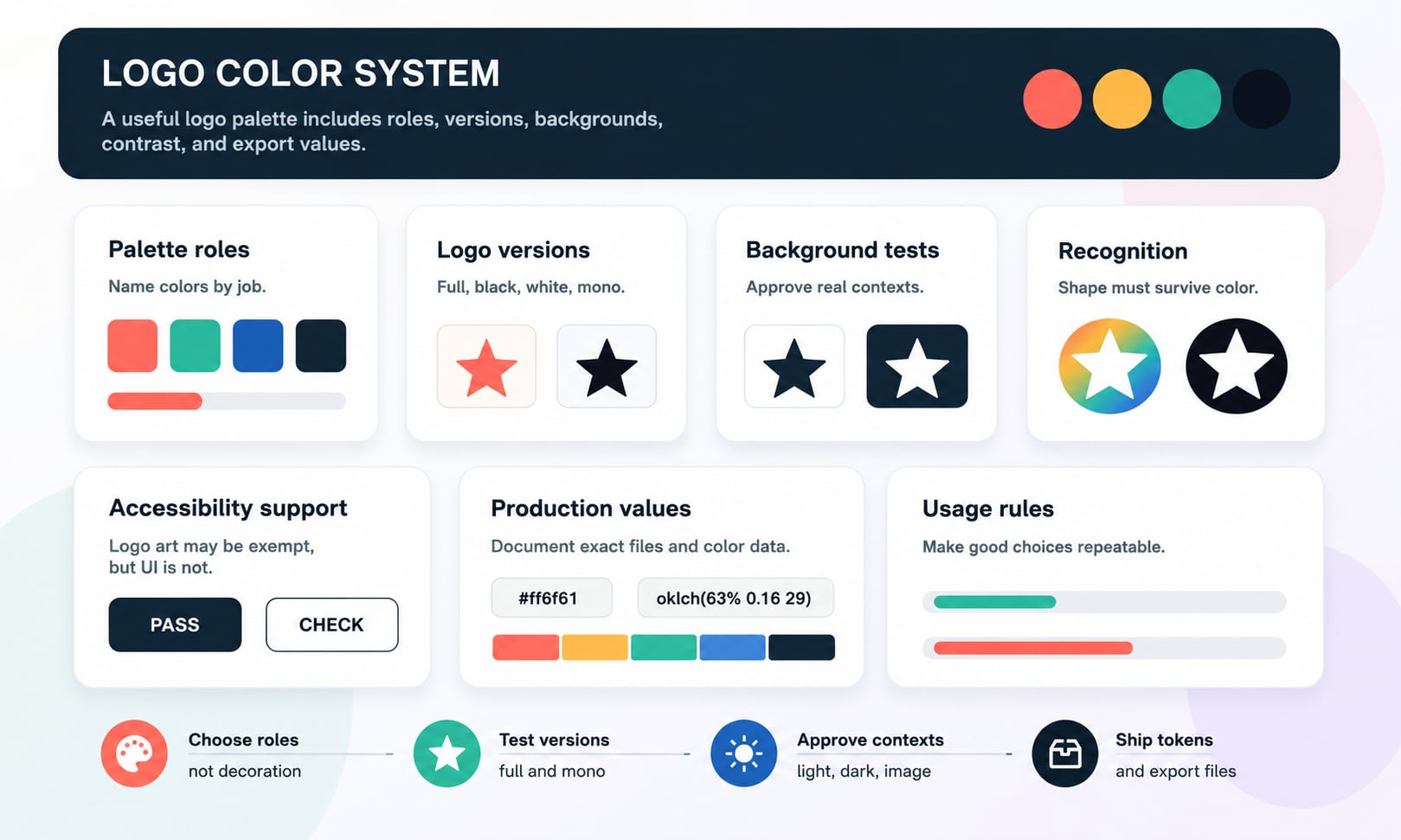
Full-color, one-color, black, white, and reversed versions
A logo that only works in full color is fragile. Real brands appear on invoices, receipts, social avatars, sponsorship walls, app icons, embroidered apparel, rubber stamps, favicons, dark headers, email signatures, and third-party sites. Those contexts often require simplified color treatments.
At minimum, define the primary full-color logo, a one-color version, a black version, a white version, and a reversed version for dark or colored backgrounds. The one-color version is especially important because it proves whether the logo shape is strong without relying on color separation.
Full-color version
The main mark with the complete approved palette. Use when the background and reproduction quality are controlled.
One-color version
A single-color mark that works for embossing, engraving, embroidery, low-cost print, stamps, and tiny applications.
Black version
The default neutral mark for documents, forms, print, and contexts where color is unavailable or inappropriate.
White or reversed version
The light mark for dark surfaces, photography overlays, event graphics, video, and dark-mode headers.
Test backgrounds before approving colors
Logo colors should be tested against the surfaces where the logo will live. A coral mark may look clear on white and disappear on warm beige. A teal mark may work on pale gray and lose its edge on blue photography. A dark mark may pass on light backgrounds but feel too heavy in a delicate brand system.
Background rules prevent misuse. Define approved light backgrounds, approved dark backgrounds, approved brand-color backgrounds, photography rules, overlay requirements, and disallowed pairings. A logo guide should make bad combinations easy to avoid.
| Context | What to test | Rule to document |
|---|---|---|
| White or light surface | Full-color and dark-neutral mark visibility | Approved default logo version |
| Dark surface | White, reversed, or light-neutral mark visibility | Approved reversed logo version |
| Brand-color background | Whether the mark keeps separation and identity | Allowed color-on-color combinations |
| Photography or video | Busy areas, low contrast, and visual noise | Overlay, scrim, or placement rules |
| Tiny sizes | Favicon, avatar, app icon, and sponsor strip use | Simplified mark and minimum size |
Logo contrast and accessibility
WCAG includes exceptions for logotypes in certain text contrast requirements, but that does not mean logo color can ignore accessibility. The logo may be exempt as brand artwork, while the navigation text, button text, tagline, form labels, icons, focus indicators, and surrounding UI are still subject to accessibility expectations.
The practical approach is to test logo visibility for recognition and test all functional content with the right contrast criteria. If a logo lockup includes a tagline or descriptor that users need to read, treat that text seriously. If the logo sits in a button, header, or app shell, the surrounding UI still needs accessible states.
Separate artwork from functional text
Logo art can be evaluated for recognition, while readable brand copy should be checked like other text.
Do not communicate by color alone
If logo color marks a product tier, status, or category, use labels or other cues too.
Check adjacent UI
Headers, buttons, focus rings, links, icon buttons, and forms around the logo still need contrast decisions.
Color should support recognition, not replace shape
A strong logo should remain recognizable when color is removed. If people can only identify the brand because the mark is blue or orange, the shape system may be too weak. Shape, proportion, rhythm, typography, and composition should carry identity first; color should add memorability and emotional tone.
This is why one-color testing is not optional. A logo that works in black and white usually has stronger bones. A logo that falls apart without gradients, shadows, or color separation may need simplification before color is finalized.
Squint test
The logo should remain distinct when viewed small, blurred, or at a glance.
Monochrome test
The logo should still make sense in black, white, or one spot color.
Silhouette test
The main mark should have a clear outer shape or internal rhythm that survives color loss.
How many colors should a logo use?
Many effective logos use one to three colors. Fewer colors are easier to reproduce, remember, and adapt. More colors can work, especially for expressive, family, creative, entertainment, education, or portfolio brands, but each extra color adds production rules and more chances for inconsistency.
The right number depends on the brand system. A single-color logo can feel confident and flexible. A two-color logo can create contrast and hierarchy. A three-color logo can add energy or category meaning. A gradient or multicolor logo needs stronger fallback rules because it will not work everywhere.
| Color count | Strength | Risk |
|---|---|---|
| One color | Simple, memorable, flexible, inexpensive to reproduce | May need supporting palette for broader brand expression |
| Two colors | Clear hierarchy and useful contrast | Can become dependent on color separation if shape is weak |
| Three colors | More personality and brand range | Needs tighter rules to avoid noisy applications |
| Gradient or multicolor | Expressive and modern when controlled | Harder for print, embroidery, tiny sizes, and one-color contexts |
Color psychology without cliches
Color associations are real, but they are not universal laws. A color can carry different meanings across categories, cultures, price points, politics, seasons, and competitors. Treat color psychology as a research prompt, not a final answer.
Instead of asking what a color always means, ask what it means in this market, for this audience, next to these competitors, with this typography, on these materials, and in these digital contexts. The same blue can feel institutional, technical, calm, cold, generic, premium, or playful depending on the system around it.
Red
Can signal energy, urgency, food, sale, danger, warmth, or celebration depending on context.
Blue
Can signal trust, technology, finance, calm, coldness, healthcare, or generic safety.
Green
Can signal nature, wellness, finance, growth, permission, sustainability, or freshness.
Black and white
Can signal luxury, simplicity, clarity, neutrality, editorial confidence, or austerity.
Digital color values for logos
Logo colors need exact digital values. For web and product work, that usually means HEX and RGB values, plus modern values such as OKLCH if the brand system uses perceptual color tooling. The important part is to define a canonical source of truth and generate other formats from it rather than hand-maintaining conflicting values.
For CSS and color roles, name logo colors by job. A role named --brand-primary is clearer than a role named --red-500 when the color belongs to identity. If the same color appears in UI controls, create role-specific names so the logo color is not automatically misused as a button, alert, link, or text color.
| Need | Example | Why it matters |
|---|---|---|
| Primary brand color | --brand-primary: #ff6f61 | Canonical identity value for digital use |
| RGB value | rgb(255 111 97) | Useful for CSS, exports, and conversion tools |
| Perceptual value | oklch(...) | Useful for modern scale and accessibility work |
| Approved text pair | --brand-primary-text: #10151f | Prevents unreadable foreground choices |
| Logo file reference | logo-primary.svg | Connects color values to actual assets |
Print, materials, and production color
Screen color and print color are not identical. A logo that looks electric on a wide-gamut display may look dull in CMYK, shift on uncoated paper, or become difficult to embroider. Materials, inks, lighting, paper, fabric, vinyl, metal, and coating all affect the final color.
A responsible logo color guide should include print guidance, proofing expectations, and vendor rules. If exact color matching matters, the brand may need spot color specifications and printed proofs rather than only HEX values copied from a website.
CMYK
Useful for process print, but not every bright screen color can be reproduced cleanly in CMYK.
Spot color
Useful when brand-critical print color needs tighter control across vendors and materials.
Material tests
Check embroidery, signage, packaging, stickers, business cards, and merchandise before finalizing rules.
Proofing
Approve physical proofs for important print runs instead of trusting screen previews.
Logo color and trademarks
A logo can function as part of a brand identifier, and in some situations color can be part of trademark presentation. That does not mean every logo color is legally protectable or that choosing a color automatically creates protection. Trademark rules depend on jurisdiction, distinctiveness, use, registration, and legal context.
For practical brand work, document whether color is essential to the mark. Some brands need a color-specific primary mark. Others should file, export, or use marks in black and white or one-color form because the shape and name are the core identifiers. Legal decisions should be made with qualified trademark counsel.
Color-specific use
Use when the exact color presentation is part of the intended brand identity and should be controlled.
Black-and-white use
Use when the mark needs broad flexibility and recognition should not depend on one color presentation.
Not legal advice
Logo color decisions can affect trademark strategy, but registration and enforcement questions need legal review.
Minimum size, clear space, and small icons
Color changes when a logo gets small. Thin color gaps close up, gradients flatten, small accent colors disappear, and low-contrast outlines vanish. A logo color system should define the smallest allowed size and a simplified mark for tiny contexts.
Favicons, app icons, social avatars, profile images, map pins, and sponsor grids often need a reduced version of the logo. The reduced version may use fewer colors, a stronger silhouette, more contrast, or a different background shape.
Minimum size
Define the smallest pixel and print size where the logo remains recognizable.
Clear space
Protect enough surrounding space so backgrounds and nearby elements do not weaken recognition.
Small mark
Create a simplified icon or symbol for contexts where the full logo is too detailed.
Common logo color mistakes
Logo color mistakes are usually system mistakes. The color looked good once, but the team did not prove it across backgrounds, sizes, file formats, production methods, or accessibility contexts.
Mistake: choosing only for mood
A color can fit the mood and still fail in production, contrast, or category differentiation.
Mistake: no one-color version
Without a one-color mark, the logo may fail in embroidery, engraving, stamps, sponsorship grids, and low-quality reproduction.
Mistake: using logo color as every UI color
A brand color may work as a mark but fail as button text, link color, disabled state, or alert background.
Mistake: no background rules
Teams will place the logo on whatever surface is available unless approved and disallowed backgrounds are documented.
Mistake: relying on color for recognition
If the mark loses identity in black and white, the shape system needs more work.
Mistake: undocumented export values
Conflicting HEX, RGB, CMYK, and file exports create drift across websites, decks, print, and vendors.
A practical logo color workflow
A good workflow starts broad and becomes precise. Explore color directions, then test recognition, background behavior, accessibility, production values, and brand usage before finalizing. The final result should be a small set of approved decisions, not a folder of attractive but undocumented options.
- Define the brand position, audience, category expectations, and differentiation goal.
- Choose a primary color direction and one or two supporting colors if the identity needs them.
- Test the mark in full color, one color, black, white, and reversed versions.
- Test approved and disallowed backgrounds, including light, dark, brand color, photography, and tiny sizes.
- Check surrounding UI and text contrast separately from logo artwork.
- Document exact HEX, RGB, OKLCH if used, CMYK or spot color guidance, and export files.
- Create semantic brand roles and usage rules so teams, vendors, and AI systems can apply the logo consistently.
How Hue Codex supports logo color work
Hue Codex helps turn logo color ideas into practical systems. Use the color picker and converter to capture exact values, compare HEX, RGB, HSL, Lab, LCH, OKLab, and OKLCH, generate related tints and shades, build supporting palettes, and check contrast for real foreground and background pairs.
The important step is separating logo identity from UI usability. A logo color can be the seed of a brand system, but it still needs accessible companions, neutral support, approved pairings, and export-ready documentation before it becomes a durable brand color system.
Sources and further reading
This guide is written from practical brand identity and design-system usage and cross-checked against primary trademark, CSS color, and accessibility references.
Try it in Hue Codex
Use the free tools to test the idea immediately: pick a color, convert it, generate harmonies, build tints and shades, check contrast, and export practical CSS or palette data.
Quick answers
Logo color basics FAQ
What makes a good logo color?
A good logo color fits the brand strategy, stands out in the category, remains recognizable across contexts, reproduces accurately, works on approved backgrounds, and has documented full-color, one-color, black, white, and reversed versions.
How many colors should a logo use?
Many logos work best with one to three core colors. One color is simple and flexible, two colors can create hierarchy, and three colors can add personality. More colors require stronger usage rules and production testing.
Does every logo need a black and white version?
Yes in most professional identity systems. Black, white, and one-color versions make the logo usable in print, engraving, embroidery, dark backgrounds, documents, favicons, sponsorship grids, and contexts where full color is not available.
What is a reversed logo?
A reversed logo is a light version of a mark, often white or near-white, designed for dark or colored backgrounds. It should be tested separately because simply inverting colors may not preserve the intended look.
Should logo colors pass WCAG contrast?
Logo artwork can be exempt from some WCAG text contrast requirements, but surrounding UI, readable text, taglines, controls, and functional brand applications still need appropriate contrast and non-color cues.
Can a logo color fail accessibility?
A logo color can be hard to see on certain backgrounds, and brand applications using that color can fail contrast. Test the logo for recognition and test functional text or UI elements with accessibility criteria.
Should logo colors match website UI colors?
Sometimes, but not always. A logo color can seed the UI palette, but interfaces often need additional neutrals, accessible text colors, hover states, disabled states, semantic colors, and dark-mode variants.
What color format should logo colors use?
For digital work, document HEX and RGB at minimum. For modern palette systems, OKLCH can also be useful. For print, document CMYK or spot color guidance when needed. Keep one canonical source of truth and generate other formats from it.
Should I use gradients in a logo?
Gradients can work for some brands, but they need strong fallback rules. A gradient logo should also have one-color, black, white, and simplified versions for small sizes, print, embroidery, and low-quality reproduction.
What is the biggest logo color mistake?
The biggest mistake is approving a color because it looks good in one mockup, without testing backgrounds, one-color use, small sizes, accessibility, print, exports, and real brand applications.
Can a color be trademarked?
In some situations, color can be part of trademark presentation, but protectability depends on jurisdiction, distinctiveness, use, registration, and legal context. Logo color and trademark strategy should be reviewed with qualified counsel.
How do I make logo color rules easier for a team to follow?
Document approved versions, backgrounds, clear space, minimum size, exact color values, file formats, disallowed uses, accessible pairings, and role-based tokens. Clear rules reduce inconsistent brand use.